
The HyperTerminal Windows 10: Everything You Need to Know
HyperTerminal, a popular communications program in earlier versions of Windows, was used for connecting to other computers, BBS systems, and networking devices. However, with the release of Windows 10, HyperTerminal was removed from the operating system. This left many users wondering how they could achieve similar functionality in the latest version of Windows.
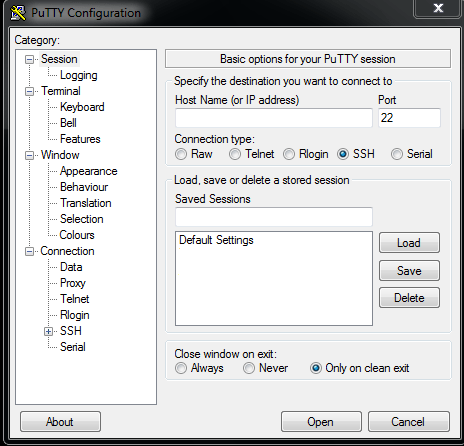
While HyperTerminal is no longer included in Windows 10 by default, there are alternative solutions available that can provide similar features and functionalities. One such option is using third-party software like PuTTY or Tera Term, which offer terminal emulation capabilities and support for various communication protocols.
Another option for Windows 10 users is to utilize the built-in Windows PowerShell or Command Prompt as a replacement for HyperTerminal. These command-line interfaces can be used for executing commands and managing devices through serial connections.
For those who prefer a graphical user interface similar to HyperTerminal, applications like RealTerm or Termite can be installed on Windows 10 to establish serial communication with devices.
Overall, while the absence of HyperTerminal in Windows 10 may have initially posed a challenge for users accustomed to its features, there are several alternatives available that can effectively fulfill the same functions. Whether you opt for third-party software or utilize built-in tools like PowerShell or Command Prompt, you can still achieve seamless communication with your devices on Windows 10.
Top 5 Advantages of Using HyperTerminal on Windows 10 for Serial Communication and Network Management
- 1. User-friendly interface for establishing serial connections
- 2. Ability to communicate with various devices such as routers, switches, and embedded systems
- 3. Support for multiple communication protocols like TCP/IP, Telnet, and SSH
- 4. Convenient for troubleshooting and configuring network devices remotely
- 5. Offers features like logging sessions and transferring files between connected devices
Challenges of Using HyperTerminal Alternatives on Windows 10
- HyperTerminal is not included in Windows 10 by default, requiring users to seek alternative solutions.
- Users may face compatibility issues with older devices and systems that rely on HyperTerminal for communication.
- Third-party software or alternative tools may not offer the exact same features and interface as HyperTerminal, leading to a learning curve for some users.
- Setting up and configuring third-party terminal emulation software on Windows 10 may require additional time and effort compared to using a built-in program like HyperTerminal.
1. User-friendly interface for establishing serial connections
The user-friendly interface of HyperTerminal in Windows 10 makes it a valuable tool for establishing serial connections with ease. With its intuitive layout and straightforward navigation, users can quickly set up and manage connections to various devices. The clear display of communication settings and options simplifies the process of configuring serial ports, baud rates, and other parameters, ensuring a seamless connection experience. This user-centric design enhances efficiency and convenience for users seeking to establish reliable serial connections on Windows 10.
2. Ability to communicate with various devices such as routers, switches, and embedded systems
One significant advantage of using HyperTerminal on Windows 10 is its ability to communicate with a wide range of devices, including routers, switches, and embedded systems. This feature is invaluable for network administrators, IT professionals, and hobbyists who need to establish connections and configure settings on different types of hardware. By leveraging HyperTerminal’s compatibility with various devices, users can efficiently troubleshoot issues, perform maintenance tasks, and ensure seamless communication across their network infrastructure.
3. Support for multiple communication protocols like TCP/IP, Telnet, and SSH
One significant advantage of using HyperTerminal alternatives on Windows 10 is the robust support for multiple communication protocols such as TCP/IP, Telnet, and SSH. This feature allows users to establish secure and reliable connections with a wide range of devices and systems, enhancing flexibility and compatibility in various networking environments. By supporting these protocols, users can effectively manage and troubleshoot network devices, servers, and other equipment with ease, making it a versatile tool for communication in diverse settings.
4. Convenient for troubleshooting and configuring network devices remotely
HyperTerminal in Windows 10 offers the significant advantage of being convenient for troubleshooting and configuring network devices remotely. This feature allows users to establish connections with network devices, such as routers or switches, from a remote location. By utilizing HyperTerminal, users can diagnose issues, modify settings, and perform maintenance tasks on network equipment without the need for physical access. This remote accessibility enhances efficiency and flexibility in managing network infrastructure, making HyperTerminal a valuable tool for IT professionals and system administrators.
5. Offers features like logging sessions and transferring files between connected devices
One notable advantage of using HyperTerminal in Windows 10 is its ability to offer features such as logging sessions and facilitating file transfers between connected devices. By allowing users to log their communication sessions, HyperTerminal enables them to review past interactions for reference or troubleshooting purposes. Additionally, the capability to transfer files between connected devices directly within the application streamlines data exchange processes, enhancing efficiency and convenience for users managing multiple devices simultaneously. These features contribute to the versatility and practicality of HyperTerminal in Windows 10, making it a valuable tool for various communication and networking tasks.
HyperTerminal is not included in Windows 10 by default, requiring users to seek alternative solutions.
One notable drawback of HyperTerminal in Windows 10 is its absence from the operating system by default, necessitating users to explore alternative solutions. This can be inconvenient for individuals who relied on HyperTerminal for various communication tasks in previous Windows versions, as they now have to invest time and effort into finding and setting up alternative software or tools to achieve similar functionalities. The lack of built-in support for HyperTerminal in Windows 10 may pose a challenge for users seeking a seamless and familiar communication experience, prompting them to adapt to different applications or methods to meet their needs effectively.
Users may face compatibility issues with older devices and systems that rely on HyperTerminal for communication.
Users may encounter compatibility issues with older devices and systems that depend on HyperTerminal for communication when using Windows 10. Since HyperTerminal is no longer included in the operating system, users may find it challenging to establish connections with legacy equipment that specifically require the functionalities offered by HyperTerminal. This can create obstacles for individuals who rely on older technology that is not compatible with the alternative solutions available in Windows 10, potentially leading to communication disruptions and limitations in accessing vital resources or information.
Third-party software or alternative tools may not offer the exact same features and interface as HyperTerminal, leading to a learning curve for some users.
When relying on third-party software or alternative tools to replace HyperTerminal in Windows 10, users may encounter a con in the form of potential differences in features and interface. These alternatives may not provide the exact same user experience as HyperTerminal, resulting in a learning curve for some individuals. Adjusting to new functionalities and interfaces can be challenging for users accustomed to the familiarity of HyperTerminal, requiring them to invest additional time and effort in mastering the nuances of these alternative solutions.
Setting up and configuring third-party terminal emulation software on Windows 10 may require additional time and effort compared to using a built-in program like HyperTerminal.
Setting up and configuring third-party terminal emulation software on Windows 10 can be a drawback compared to the convenience of using a built-in program like HyperTerminal. Users may find that installing and customizing external applications for terminal emulation requires additional time and effort. This process may involve downloading the software, adjusting settings, and familiarizing oneself with a new interface, which can be more complex than utilizing a pre-installed tool like HyperTerminal. Despite the benefits that third-party software may offer, such as advanced features and compatibility with modern systems, the initial setup and configuration process could present a barrier for users seeking a quick and straightforward solution for serial communication on Windows 10.
Tags: alternative solutions, bbs systems, command prompt, communication protocols, communications program, embedded systems, graphical user interface, hyperterminal, hyperterminal windows 10, networking devices, putty, realterm, replacement, routers, serial communication, serial connections, switches, tera term, terminal emulation capabilities, termite, user-friendly interface, windows 10, windows powershell