
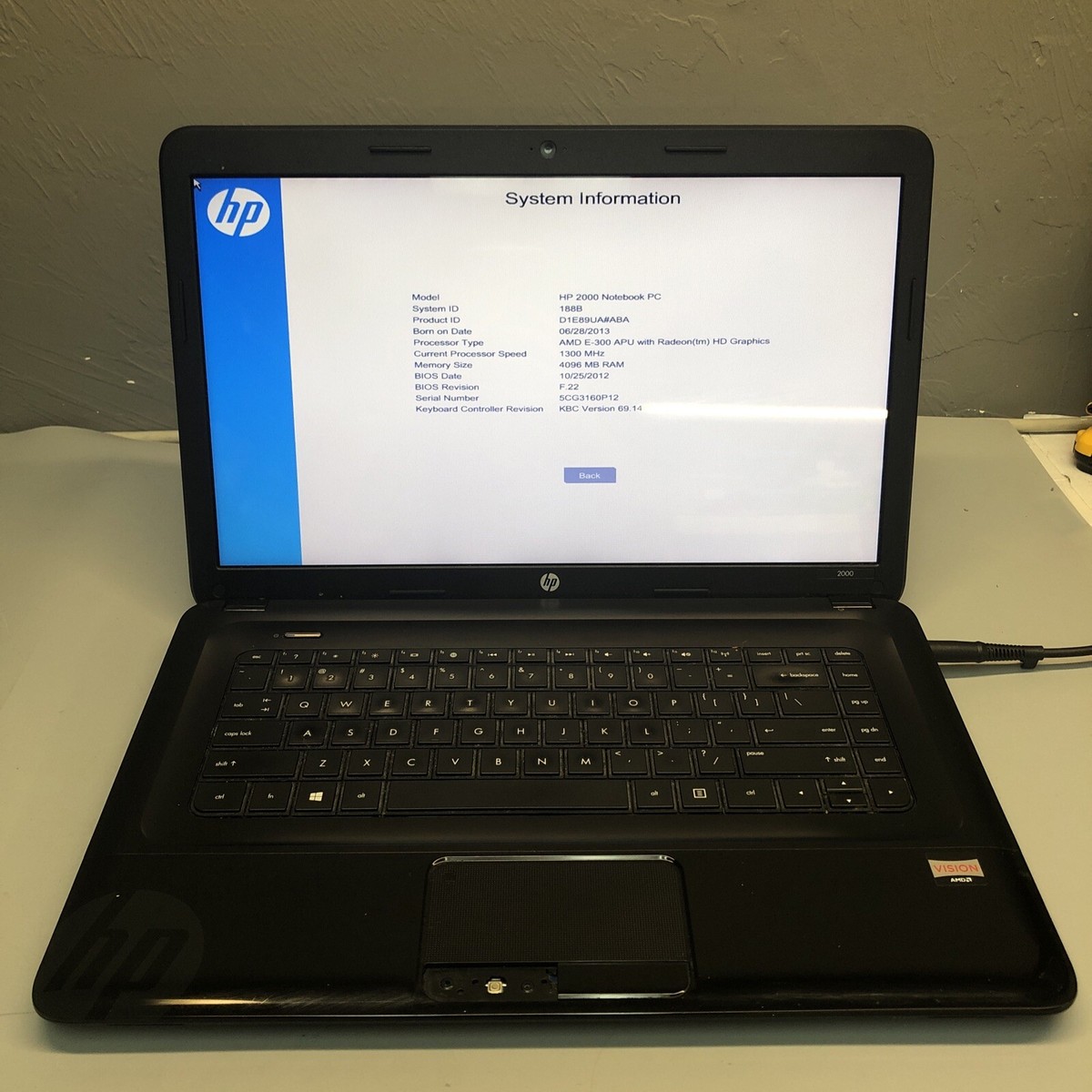
HP 2000 Notebook PC: An Overview of HP’s Everyday Laptop
The HP 2000 Notebook PC is a family of budget-friendly laptops designed for everyday computing. Sold in multiple configurations, the series was aimed at people who needed a straightforward computer for tasks such as browsing the web, writing documents, checking email, and watching videos.
Because HP released several versions of the 2000 Notebook PC, specifications can differ significantly from one model to another. The model number and product configuration are important when checking compatibility, looking for replacement parts, or comparing performance.
What Is the HP 2000 Notebook PC?
The HP 2000 name refers to a range of consumer notebooks rather than one single, identical computer. Different models were sold with different processors, memory capacities, storage drives, screens, and operating systems. Some configurations used AMD processors, while others used Intel processors.
These laptops were built for general-purpose use, not demanding gaming or professional creative work. Their original performance was suitable for common tasks of their time, though current software and websites may place heavier demands on older hardware.
Common Features
Depending on the specific configuration, an HP 2000 Notebook PC may include features such as:
- A 15.6-inch display
- An AMD or Intel processor
- Integrated graphics
- Upgradeable system memory
- A traditional hard drive or, in some cases, a solid-state drive installed later
- USB ports, a headphone jack, and video output
- A built-in webcam and wireless networking
- A full-size keyboard with a numeric keypad on many models
These are general characteristics of the product family, not guaranteed specifications for every unit. Check the complete model number, the label on the laptop, or the system information in its operating system to confirm the details of a particular computer.
Everyday Performance
When new, the HP 2000 was intended for basic home and school use. A well-maintained unit may still be useful for lightweight tasks, such as typing, managing files, or using compatible offline applications. Performance depends on its processor, memory, storage, operating system, and overall condition.
If the laptop still has its original mechanical hard drive, replacing it with a compatible solid-state drive can often make startup and everyday file access feel faster. Adding memory may also help, but the supported memory limit varies by model. Before purchasing parts, confirm compatibility using the laptop’s full product number and service documentation.
Operating System and Security
Many HP 2000 laptops originally shipped with older versions of Windows. Those systems may no longer receive security updates, depending on the version installed. An unsupported operating system can expose a computer to security risks, especially when it is connected to the internet.
Before using an older laptop for online banking, shopping, or storing sensitive information, check whether its operating system is still supported and whether the hardware can run a currently supported alternative. If a suitable supported system is not available, consider limiting the laptop to offline tasks or replacing it with a newer computer.
Battery and Replacement Parts
Battery life on a used HP 2000 depends largely on the battery’s age and condition. Laptop batteries lose capacity over time, so an older battery may provide much less runtime than it did when the computer was new. A replacement battery may be available, but the correct part depends on the exact model.
The same is true for chargers, keyboards, memory, and other components. Match replacement parts to the laptop’s full model or product number rather than relying on the “HP 2000” name alone. Before opening the computer, follow appropriate safety instructions and disconnect the power source.
Is the HP 2000 Notebook PC Still Worth Using?
An HP 2000 may still serve as a basic computer if it is in good condition and meets your needs. It can be suitable for simple offline work, learning about computer maintenance, or running lightweight applications. However, its age may mean slower performance, limited compatibility with modern software, worn components, and reduced battery life.
For frequent video calls, current games, demanding applications, or sensitive online activity, a newer device is generally a better choice. If you already own an HP 2000, a storage upgrade and a fresh, supported software setup may improve its usefulness—provided the exact model supports those changes.
How to Identify Your Exact Model
To find specifications or compatible parts, locate the complete model or product number. It may be printed on a label on the underside of the laptop or shown in the computer’s system information. Record the number before searching for drivers, manuals, batteries, or upgrade components.
Final Thoughts
The HP 2000 Notebook PC was designed as an accessible laptop for everyday computing. Its capabilities vary by configuration, and today its usefulness depends on the specific hardware, software support, and physical condition. Identifying the exact model is the best first step when deciding whether to upgrade, repair, or replace one.
Essential Tips for Maintaining Your HP 2000 Notebook PC
- Keep the HP 2000 notebook PC’s vents clear to prevent overheating.
- Use the correct HP-compatible charger for your model.
- Back up important files regularly.
- Install available security and system updates.
- Replace an aging battery if it no longer holds a charge.
Keep the HP 2000 notebook PC’s vents clear to prevent overheating.
Keep the HP 2000 Notebook PC’s air vents clear to help prevent overheating and maintain reliable performance. Place the laptop on a hard, flat surface rather than a bed, blanket, or cushion, which can block airflow. Regularly check the vents for dust and gently clean them with compressed air, following the manufacturer’s safety guidance.
Use the correct HP-compatible charger for your model.
Use the correct HP-compatible charger for your HP 2000 Notebook PC, since power requirements can vary by model. Check the laptop’s label or manual for the required voltage, amperage, and connector type, then choose a genuine HP adapter or a reputable compatible replacement that matches those specifications. Using an incompatible charger may prevent the laptop from charging properly or could damage the computer or battery.
Back up important files regularly.
Back up important files regularly to protect your photos, documents, and other data from hard drive failure, accidental deletion, or malware. On an HP 2000 Notebook PC, save copies to an external drive or a trusted cloud storage service, and check occasionally that the files can be opened. Regular backups are especially important for older laptops, since aging hardware may fail without warning.
Install available security and system updates.
Install all available security and system updates on your HP 2000 Notebook PC to help protect it from known vulnerabilities and improve reliability. First, check which operating system the laptop runs and whether it still receives official security support; some HP 2000 models use older versions of Windows that no longer get updates. If updates are available, connect to a trusted network, back up important files, and install them through the operating system’s update settings. For unsupported systems, avoid sensitive online activities and consider upgrading to a supported operating system or replacing the laptop.
Replace an aging battery if it no longer holds a charge.
If your HP 2000 Notebook PC’s battery no longer holds a charge, replacing it can restore the convenience of using the laptop without keeping it plugged in. Battery compatibility varies by model, so check the notebook’s full product number and confirm the replacement battery matches before buying. Choose a reputable supplier, and follow the manufacturer’s safety instructions when removing and installing the battery.
Tags: 15.6-inch display, amd processor, budget laptop, compatible replacement parts, everyday computing, hp 2000 laptop, hp 2000 model number, hp 2000 notebook pc, hp 2000 specifications, identify hp laptop model, intel processor, laptop battery replacement, laptop memory upgrade, laptop performance, solid-state drive upgrade, upgrade or replace laptop, windows security updates