
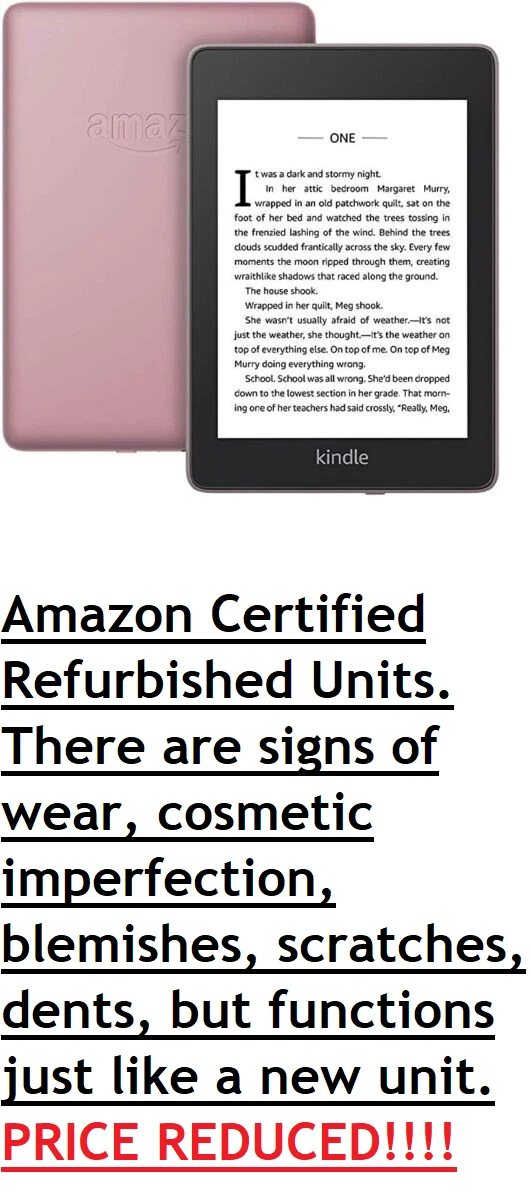
Amazon Kindle Reader: A Guide to Amazon’s E-Reader
The Amazon Kindle is a dedicated e-reader designed for reading digital books, magazines, and other written content. Its lightweight design and paper-like display make it a popular alternative to carrying physical books or reading for long periods on a phone or tablet.
Whether you’re a lifelong reader or looking for a convenient way to enjoy books on the go, a Kindle can make it easier to build and carry a personal library. Here’s what to know about how Kindle readers work, what they offer, and how to choose one.
What Is an Amazon Kindle Reader?
A Kindle reader is a portable device made by Amazon for reading e-books. Unlike a standard tablet, it’s focused primarily on reading. Most Kindle devices use an e-ink display, which resembles printed text and is designed to be comfortable for extended reading.
Kindle e-readers connect to Amazon’s Kindle Store, where readers can browse and buy books. You can also access eligible Kindle books through a Kindle app on a smartphone, tablet, or computer. Kindle devices and apps can sync your reading progress, bookmarks, and notes when you’re signed in to the same Amazon account.
Key Features
E-Ink Display
Kindle’s e-ink screen is different from the bright, colorful display on a tablet. It displays text with a paper-like appearance and uses front lighting on many models, so you can read in different lighting conditions. Depending on the model, you may also be able to adjust the screen’s brightness and warmth.
Long Battery Life
Because e-ink displays use power differently from typical tablet screens, Kindle readers can often run for weeks between charges. Battery life varies based on the device, screen settings, wireless use, and reading habits.
Adjustable Reading Settings
Readers can usually change the font size, font style, line spacing, and margins to suit their preferences. These options can make reading more comfortable and accessible, particularly for people who want larger text or a different page layout.
Built-In Dictionary and Search
Kindle tools can help you look up words, search within a book, highlight passages, and add notes. Some books also support features such as X-Ray, which can provide information about characters, places, or other details in the text.
Wireless Book Delivery
With a Wi-Fi connection, you can purchase and download books directly to a Kindle. Once downloaded, many titles can be read without an internet connection. Kindle devices also support certain personal documents and file types, though compatibility can depend on the format and method used to send the file.
Ways to Read Kindle Books
You don’t necessarily need a Kindle device to read Kindle books. Amazon’s Kindle app is available for compatible phones, tablets, and computers. The app is a convenient option if you prefer reading on a device you already own, while a dedicated Kindle reader offers an e-ink screen and a reading-focused experience.
Some readers can also borrow e-books from public libraries through services such as Libby, depending on the library, the title, and current Kindle availability. Kindle Unlimited is a separate subscription service that provides access to a rotating selection of eligible books. It does not include every title in the Kindle Store.
Benefits of Using a Kindle
- Carry many books: A single device can hold a large digital library.
- Read in different settings: A compact e-reader is easy to take on commutes, trips, or vacations.
- Customize the page: Adjust text size and other display settings to match your preferences.
- Pick up where you left off: Syncing can make it easier to continue reading across supported Kindle devices and apps.
- Keep a reading record: Highlights, notes, and bookmarks can help you remember or revisit important passages.
Things to Consider Before Buying
Kindle readers are built mainly for reading text. They’re not a full replacement for a tablet, and most models aren’t designed for web browsing, video streaming, or using a wide range of apps. If you want one device for entertainment, productivity, and reading, a tablet may be a better fit. If reading comfort and portability are your priorities, a Kindle may be more suitable.
Also consider how you get your books. Kindle is closely integrated with Amazon’s store, and e-book formats and digital rights restrictions can affect whether books purchased from other retailers work on the device. Check the current format support before buying or transferring books from another source.
Kindle models differ in price, screen size, lighting, storage, water resistance, and other features. Before choosing one, think about where you’ll read most often, whether you want a larger screen, and whether features like waterproofing or page-turn buttons matter to you. Model names and specifications can change, so review Amazon’s current product details before making a purchase.
Is an Amazon Kindle Reader Worth It?
A Kindle reader can be a worthwhile choice for people who read regularly and want a lightweight, distraction-reduced way to access digital books. Its adjustable text, portable library, and paper-like display are especially useful for readers who travel or prefer not to read on a bright phone or tablet screen.
It may be less appealing if you primarily read print books, want a device for general-purpose apps, or prefer buying e-books from a variety of stores. The best choice depends on your reading habits, budget, and preferred way to access books.
Final Thoughts
The Amazon Kindle reader offers a convenient way to read digital books at home or on the go. With a selection of devices, customizable reading settings, and access to Amazon’s Kindle Store, it can suit many different kinds of readers. Compare the available models and consider how you plan to find and read books before deciding whether a Kindle belongs in your reading routine.
Amazon Kindle Reader FAQs: How It Works, Buying Books, Library Access, Battery Life, and Choosing a Model
- What is an Amazon Kindle reader, and how does it work?
- Do I need a Kindle device to read Kindle books?
- How do I buy and download books on a Kindle?
- Can I read library books on an Amazon Kindle?
- How long does a Kindle battery last on a single charge?
- Which Amazon Kindle model should I buy?
What is an Amazon Kindle reader, and how does it work?
An Amazon Kindle reader is a portable e-reader designed for digital books and other written content. It uses an e-ink display that looks similar to printed paper and is built for comfortable reading. Connect the Kindle to Wi-Fi to browse and download books from the Kindle Store, then read them on the device—even without an internet connection once they’re downloaded. You can also adjust settings such as font size and brightness, and sync your reading progress across supported Kindle devices and apps.
Do I need a Kindle device to read Kindle books?
No, you don’t need a Kindle device to read Kindle books. You can read them using Amazon’s free Kindle app on a compatible smartphone, tablet, or computer. Your reading progress, bookmarks, and notes can sync across supported devices when you’re signed in to the same Amazon account.
How do I buy and download books on a Kindle?
To buy and download books on a Kindle, connect the device to Wi-Fi and sign in to your Amazon account. Open the Kindle Store, search or browse for a book, select it, and choose the purchase option. The book will usually download to your Kindle automatically; if it doesn’t, open your library and tap the book’s cover to download it. You can also buy Kindle books on Amazon’s website or app and send them to your Kindle device.
Can I read library books on an Amazon Kindle?
Yes, you can read many library e-books on an Amazon Kindle in the U.S. by borrowing an eligible title through a participating public library, usually with the Libby app or your library’s website, and choosing the option to read with Kindle. You’ll be redirected to Amazon to send the borrowed book to your Kindle. Availability depends on your library, the specific title, and its Kindle compatibility. Library loans expire automatically, though you can return a book early through your library account.
How long does a Kindle battery last on a single charge?
A Kindle battery can last for several weeks on a single charge, depending on the model and how you use it. Battery life is affected by factors such as screen brightness, Wi-Fi or Bluetooth use, and how much time you spend reading each day. For the longest battery life, lower the brightness when possible and turn off wireless connections when you don’t need them.
Which Amazon Kindle model should I buy?
The best Amazon Kindle depends on how you read. Choose the standard Kindle for an affordable, lightweight e-reader; consider the Kindle Paperwhite if you want a larger screen, adjustable warm light, or water resistance; and look at a color model if you read illustrated books or comics. If you want to write or mark up documents, a Kindle Scribe may be a better fit. Compare the current models’ features and prices, then choose the one that matches your reading habits and budget.
Tags: adjustable reading settings, amazon account, amazon kindle, amazon kindle reader, battery life, built-in dictionary, digital books, digital library, e-book formats, e-books, e-ink display, e-reader, font size, kindle app, kindle reader, kindle store, kindle unlimited, libby, reading habits, reading portability, screen brightness, waterproofing, wireless book delivery