
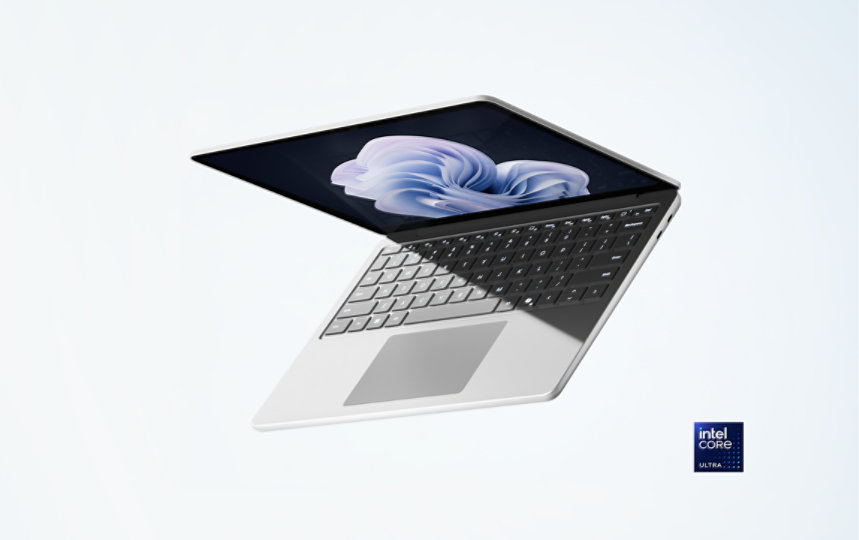
Microsoft Laptops: What to Know Before You Buy
When people search for a Microsoft laptop, they’re usually looking for a computer made by Microsoft under its Surface brand. Surface laptops combine Microsoft hardware with Windows, offering a polished experience for work, school, creative projects, and everyday use.
Microsoft’s laptop lineup changes over time, with different models and configurations aimed at different needs. Before choosing one, it helps to understand the main Surface options, what they do well, and which features matter most for your everyday tasks.
What Is a Microsoft Surface Laptop?
A Surface Laptop is a portable Windows computer designed and sold by Microsoft. Depending on the model, it may include a traditional clamshell design, a touchscreen, or a screen that can fold back or detach for tablet-style use. Surface devices are available in different sizes and hardware configurations, so performance, battery life, and features vary by model.
Surface laptops are designed to work closely with Windows and Microsoft services such as Microsoft 365, OneDrive, and Windows Hello. They can also run a wide range of Windows apps, though compatibility and performance depend on the device’s processor and configuration.
Common Types of Microsoft Laptops
Surface Laptop
The standard Surface Laptop is a traditional notebook with a built-in keyboard and trackpad. It’s a good fit for browsing, writing, video calls, schoolwork, and office tasks. Many models include a touchscreen, giving you the option to tap and scroll directly on the display.
Surface Laptop Studio
Surface Laptop Studio models feature a flexible display design intended for people who want more than a conventional laptop. Depending on the configuration, they may suit tasks such as digital drawing, photo editing, and other creative work. Check the specifications carefully if you need higher performance for demanding applications.
Surface Pro
Surface Pro is a detachable tablet that can function like a laptop when paired with a compatible keyboard accessory. It’s useful for people who value portability and touchscreen input. Keep in mind that the keyboard may be sold separately, so include accessory costs in your budget.
Benefits of Choosing a Microsoft Laptop
- Windows integration: Surface devices offer a straightforward way to use Windows and Microsoft services together.
- Portable designs: Many models are built for commuting, travel, or carrying between classes and meetings.
- Touchscreen options: Select models support touch input, which can be convenient for navigation, note-taking, and creative work.
- Premium construction: Surface laptops are generally designed with a clean, streamlined look and a focus on everyday usability.
- Variety of form factors: The lineup includes traditional laptops and flexible or detachable devices.
Things to Consider Before Buying
Performance
Choose a processor and memory configuration that match your workload. Web browsing, email, and document editing have modest requirements, while video editing, software development, and large creative projects may benefit from more capable hardware. For demanding work, compare independent performance reviews as well as the manufacturer’s specifications.
Memory and Storage
Memory affects how smoothly a laptop handles multiple apps at once. Storage determines how much room you have for applications and files. If you keep a large photo or video library, consider a higher-capacity drive or a reliable cloud or external-storage plan. Some Surface models have limited upgrade options, so verify what can be changed before purchasing.
Display Size and Type
A larger display can make multitasking and creative work more comfortable, while a smaller laptop is typically easier to carry. Compare resolution, brightness, aspect ratio, and touchscreen support. If you work outdoors or in bright rooms, display visibility may be especially important.
Battery Life
Battery performance depends on the specific model, settings, apps, and how the laptop is used. Video calls, demanding software, high screen brightness, and heavy multitasking can reduce runtime. Look for independent battery tests that reflect your typical usage rather than relying only on advertised estimates.
Ports and Accessories
Check which ports are available and whether you’ll need an adapter, dock, external monitor, or other accessories. For a Surface Pro, confirm whether a keyboard, pen, or other add-on is included. These extras can affect the total cost.
Who Should Buy a Microsoft Laptop?
A Microsoft laptop may be a strong choice for students, professionals, and everyday users who want a portable Windows device with a refined design. A standard Surface Laptop can work well for common productivity tasks, while a Surface Pro may appeal to people who want a tablet that can also serve as a laptop. Creative professionals and power users should compare the exact processor, memory, graphics, display, and app requirements before deciding.
Microsoft Laptop vs. Other Windows Laptops
Surface devices are only one part of the Windows laptop market. Other manufacturers offer a broad range of designs, prices, ports, and performance levels. A Surface laptop may be appealing if you value Microsoft’s hardware design and Windows integration, while another brand may offer a better fit for a specific budget, gaming needs, or selection of ports.
Rather than choosing by brand alone, compare specific models. Look at the full cost, warranty, keyboard comfort, display quality, performance, battery tests, and return policy. A laptop that suits your daily routine is more valuable than one with impressive specifications you rarely use.
Frequently Asked Questions
Are Microsoft laptops the same as Surface laptops?
In most shopping contexts, “Microsoft laptop” refers to a laptop or 2-in-1 device from Microsoft’s Surface family. Microsoft also makes Windows, which is used on laptops from many other manufacturers.
Can a Microsoft laptop run regular Windows apps?
Surface devices run Windows, but app compatibility can vary by model and processor architecture. Check the requirements for essential work or school software before buying, especially if you rely on specialized applications or accessories.
Is a Surface Pro a laptop?
A Surface Pro is primarily a detachable tablet, but it can be used like a laptop with a compatible keyboard. Consider whether that setup suits your typing habits and whether the keyboard is included in the price.
How do I choose the right Microsoft laptop?
Start with your budget and main tasks. Then compare screen size, processor, memory, storage, battery-life reviews, ports, and included accessories. If possible, try the keyboard and display in person before making a final decision.
Final Thoughts
Microsoft laptops offer several ways to use Windows in a portable device, from conventional notebooks to flexible 2-in-1 designs. The right choice depends on how you work, what you can spend, and which features matter most. Compare the specifications and total cost of the exact models you’re considering, and choose the one that best fits your everyday needs.
5 Essential Tips for Optimizing Your Microsoft Surface Laptop
- Keep your Surface Laptop updated with Windows Update.
- Use a microfiber cloth to clean the screen.
- Avoid blocking the vents while charging or working.
- Back up important files to OneDrive or an external drive.
- Use Battery Saver when you need longer battery life.
Keep your Surface Laptop updated with Windows Update.
Keep your Surface Laptop updated with Windows Update to get the latest Windows features, security fixes, and device improvements. Open Settings, select Windows Update, and choose Check for updates. Install available updates and restart your laptop if prompted. Regular updates can help keep your device secure and running smoothly; save your work before restarting.
Use a microfiber cloth to clean the screen.
Use a clean, dry microfiber cloth to gently wipe your Microsoft laptop’s screen and remove dust, fingerprints, and smudges. Avoid paper towels, rough fabrics, and pressing hard, as they can scratch or damage the display. If a mark won’t come off, follow Microsoft’s cleaning guidance for your specific device and avoid spraying liquid directly onto the screen.
Avoid blocking the vents while charging or working.
Keep the vents on your Microsoft laptop clear while it’s charging or in use. Blocking them with a blanket, pillow, or your lap can restrict airflow, causing the device to heat up and its fans to work harder. Use your laptop on a firm, flat surface and leave space around the vents to help it stay cool and perform reliably.
Back up important files to OneDrive or an external drive.
Back up important files on your Microsoft laptop to OneDrive or an external drive to help protect them if your device is lost, damaged, or needs repair. OneDrive can sync files online and make them available across compatible devices, while an external drive provides a separate local copy. For extra peace of mind, check that your backup is up to date and that you can access the files when needed.
Use Battery Saver when you need longer battery life.
Use Battery Saver when you need your Microsoft laptop to last longer between charges. It can help conserve power by limiting background activity and other energy-intensive features. Turn it on from the battery or power settings when you’re away from an outlet, and adjust the options to balance battery life with performance.
Tags: 2-in-1 laptop, battery life, creative work, detachable tablet, display size, laptop accessories, laptop buying guide, laptop buying tips, laptop comparison, laptop performance, laptop ports, memory and storage, microsoft laptop, microsoft laptops, microsoft surface, portable laptop, student laptop, surface laptop, surface laptop studio, surface pro, touchscreen laptop, windows app compatibility, windows laptops