
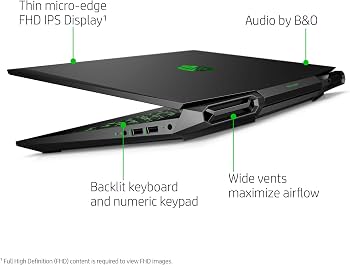
HP Pavilion Gaming Laptop: A Practical Guide for Gamers
The HP Pavilion Gaming laptop line was designed for people who wanted a gaming-capable computer without stepping up to a premium gaming model. Across its different generations and configurations, the series offered a mix of everyday usability, dedicated graphics, and features aimed at casual and mid-level gaming.
Because HP sold Pavilion Gaming laptops in many configurations, performance and features can vary considerably from one model to another. Anyone shopping for one should check the exact model number and specifications rather than relying on the Pavilion Gaming name alone.
What Is the HP Pavilion Gaming Laptop?
HP Pavilion Gaming laptops are consumer notebooks built to handle both everyday tasks and gaming. Depending on the model, they may include a dedicated NVIDIA GeForce or AMD Radeon graphics card, a multi-core processor, and a display with a higher refresh rate than a standard office laptop.
The line sits below HP’s premium gaming offerings in price and positioning. That can make a Pavilion Gaming laptop appealing to students, casual gamers, and budget-conscious shoppers who also need a machine for browsing, schoolwork, streaming, or general productivity.
Performance Depends on the Configuration
There is no single specification that applies to every Pavilion Gaming laptop. Older and newer versions may use different processors, graphics cards, memory, storage, and displays. Some configurations are suitable for popular competitive games, while others may struggle with newer, graphically demanding titles at high settings.
Before buying, look closely at these components:
- Graphics card: The dedicated GPU has a major effect on gaming performance. Check the exact model and compare independent benchmarks for the games you play.
- Processor: The CPU affects gaming, multitasking, and general responsiveness. Its generation and model matter as much as the brand.
- Memory: Check how much RAM is installed and whether it can be upgraded. Requirements vary by game and workload.
- Storage: An SSD generally makes the system feel more responsive and reduces loading times. Confirm the drive’s capacity and upgrade options.
- Display: Screen resolution, refresh rate, brightness, and color quality differ between configurations. A high refresh rate is most useful when the laptop can produce enough frames per second.
Design and Everyday Use
Pavilion Gaming laptops typically have a more understated look than some gaming notebooks, though the design varies by generation. Their larger chassis can accommodate gaming hardware, but they are generally less portable than thin-and-light laptops. Weight, charger size, and battery life are worth considering if the computer will be carried to class or work regularly.
As with most gaming laptops, battery life can drop significantly during demanding games. For the best performance, gaming usually requires the laptop to be plugged into its power adapter. Fan noise and warmth may also increase under heavy workloads.
Is a Pavilion Gaming Laptop Good for Gaming?
It can be a good fit for casual gaming, esports titles, and older games when the specific configuration has an appropriate graphics card and enough memory. More demanding games may require lower graphics settings, particularly on entry-level or older models.
For a used or refurbished laptop, check the condition of the battery, cooling system, keyboard, display, and ports. Ask about the return policy and warranty, and compare the asking price with newer laptops that offer similar performance. A low price is less attractive if the machine needs a battery replacement or runs hot under load.
Things to Check Before Buying
- Find the complete model number and verify the specifications on HP’s support pages or the seller’s listing.
- Compare the graphics card and processor with current game requirements and reliable performance tests.
- Confirm the screen resolution and refresh rate meet your needs.
- Check whether RAM and storage can be upgraded, and whether upgrades affect any warranty.
- Review the laptop’s physical condition, battery health, charger, and return terms.
Final Verdict
The HP Pavilion Gaming laptop can be a sensible choice for buyers seeking an affordable, multipurpose computer that can also play games. Its value depends on the exact configuration, condition, and price. Since the series includes many generations and hardware combinations, comparing the model’s actual specifications is essential before making a purchase.
HP Pavilion Gaming Laptop: 7 FAQs About Performance, Specs, Upgrades, Battery Life, Cooling, and Value
- Is the HP Pavilion Gaming laptop good for gaming?
- What games can an HP Pavilion Gaming laptop run?
- What are the key specifications of the HP Pavilion Gaming laptop?
- Can you upgrade the RAM and storage in an HP Pavilion Gaming laptop?
- How long does the battery last on an HP Pavilion Gaming laptop?
- Why does my HP Pavilion Gaming laptop get hot or make fan noise?
- Is the HP Pavilion Gaming laptop still worth buying?
Is the HP Pavilion Gaming laptop good for gaming?
The HP Pavilion Gaming laptop can be good for gaming, but performance depends on the specific model and its processor, graphics card, memory, and cooling. Models with a dedicated graphics card can handle many popular games, while more demanding titles may require lower graphics settings. Before buying, check benchmarks for the exact configuration and the games you plan to play.
What games can an HP Pavilion Gaming laptop run?
An HP Pavilion Gaming laptop can run many popular games, but performance depends on its specific processor, graphics card, memory, and cooling. Models with a dedicated GPU may handle games such as Minecraft, Roblox, Valorant, Rocket League, and Fortnite, while demanding titles may require lower graphics settings or reduced resolution. Check the exact laptop specifications and compare them with each game’s system requirements for the best estimate.
What are the key specifications of the HP Pavilion Gaming laptop?
The HP Pavilion Gaming laptop’s specifications vary by model and generation, but many configurations include an Intel Core i5 or i7 or an AMD Ryzen 5 or 7 processor, dedicated NVIDIA GeForce or AMD Radeon graphics, 8GB or more of memory, and SSD storage. Many models have a 15.6-inch Full HD display, with refresh rates that can vary by configuration, along with Wi-Fi, USB ports, HDMI, and other standard connections. Check the exact model number to confirm its processor, graphics card, memory, storage, and display specifications.
Can you upgrade the RAM and storage in an HP Pavilion Gaming laptop?
Yes, many HP Pavilion Gaming laptops allow you to upgrade the RAM and storage, but the options depend on the exact model. Some have accessible memory slots and support an additional or larger SSD, while others may have limits on capacity or drive type. Check your laptop’s model number and HP’s service manual before buying parts, and confirm whether an upgrade could affect your warranty.
How long does the battery last on an HP Pavilion Gaming laptop?
Battery life on an HP Pavilion Gaming laptop varies by model, battery condition, and how it’s used. Browsing the web or watching videos with the screen brightness turned down may provide several hours of use, while gaming or other demanding tasks can drain the battery much faster—often in just a few hours. For the best estimate, check reviews or specifications for the exact model, and remember that battery life typically decreases as the laptop ages.
Why does my HP Pavilion Gaming laptop get hot or make fan noise?
An HP Pavilion Gaming laptop may get hot or make fan noise when its processor or graphics card is working hard, such as during gaming, video editing, or software updates. The fans speed up to move heat away from internal components, so some warmth and noise under load are normal. To help keep temperatures in check, use the laptop on a hard, flat surface, keep its vents clear, close unnecessary apps, and make sure the vents and fans are free of dust. If the laptop becomes unusually hot, the fans run loudly even when idle, or performance suddenly drops, check for blocked airflow or background processes and contact HP Support if the issue continues.
Is the HP Pavilion Gaming laptop still worth buying?
The HP Pavilion Gaming laptop can still be worth buying if you find a well-maintained model at a good price, especially for everyday tasks, casual gaming, and less demanding titles. Its value depends on the exact configuration: check the processor, graphics card, memory, storage, and display, and compare gaming performance with newer laptops in the same price range. Because many Pavilion Gaming models are now older, also inspect battery health, cooling, and warranty or return options before purchasing.
Tags: amd radeon, battery life, budget gaming laptop, casual gaming, cooling system, display refresh rate, gaming laptop, gaming laptop buying guide, gaming performance, graphics card, hp pavilion gaming laptop, laptop specifications, model number, nvidia geforce, processor, ram, refurbished laptop, ssd storage, upgrade options, used laptop