
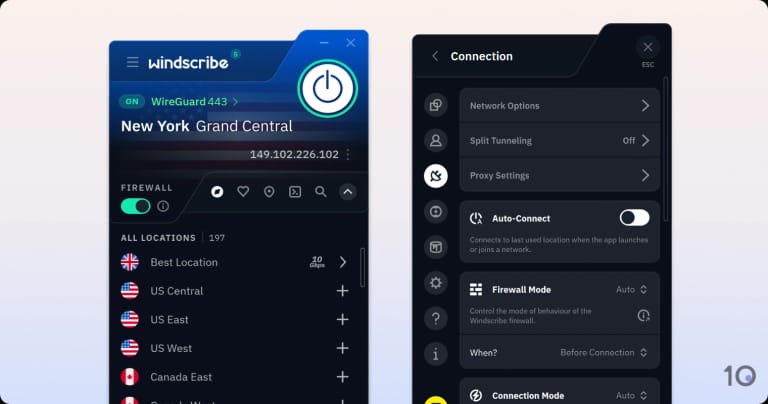
The Best Free VPN for Windows 10
Using a Virtual Private Network (VPN) on your Windows 10 PC can help enhance your online privacy and security. While there are many VPN services available, finding a reliable and free option can be challenging. Here, we have compiled a list of the best free VPNs for Windows 10:
ProtonVPN
ProtonVPN offers a free plan with unlimited bandwidth and servers in three countries. It provides strong encryption and does not log user activity.
Windscribe
Windscribe’s free plan includes 10GB of data per month and access to servers in multiple locations. It has a user-friendly interface and supports P2P file sharing.
TunnelBear
TunnelBear offers a free plan with 500MB of data per month, which can be increased by tweeting about the service. It has a simple interface and strong encryption.
Hotspot Shield
Hotspot Shield’s free version provides access to servers in the US only, but offers fast speeds and reliable performance. It is easy to use and includes ad blocking features.
Speedify
Speedify combines Wi-Fi and mobile data to provide faster speeds and better reliability. Its free plan includes 5GB of data per month.
When choosing a free VPN for your Windows 10 device, consider factors such as data limits, server locations, encryption protocols, and privacy policies. While free VPNs may have limitations compared to paid services, they can still offer valuable protection for your online activities.
Remember to research each VPN provider thoroughly before making your decision to ensure it meets your specific needs and requirements.
Top 6 Benefits of the Best Free VPN for Windows 10: Privacy, Access, and Speed
- Enhances online privacy and security on Windows 10 devices
- Provides access to geo-restricted content and websites
- Helps protect sensitive data from hackers and cyber threats
- Offers a cost-effective solution for VPN services on a limited budget
- Easy to set up and use, even for beginners
- Can improve internet speeds by bypassing ISP throttling
5 Drawbacks of Using Free VPNs on Windows 10
- Limited server options compared to paid VPNs
- Slower connection speeds due to high user traffic on free servers
- Data caps or limitations on the amount of data you can use per month
- Potential privacy risks as some free VPNs may log user data for marketing purposes
- Less reliable customer support and troubleshooting assistance compared to paid services
Enhances online privacy and security on Windows 10 devices
Using a reliable free VPN on Windows 10 devices can significantly enhance online privacy and security. By encrypting your internet connection and masking your IP address, a VPN helps protect your sensitive data from potential cyber threats and unauthorized access. Whether you are browsing the web, accessing public Wi-Fi networks, or engaging in online transactions, a VPN adds an extra layer of defense to safeguard your digital activities and personal information. With the increasing importance of maintaining privacy in today’s digital age, leveraging a trusted free VPN service can offer peace of mind while navigating the online realm on Windows 10 devices.
Provides access to geo-restricted content and websites
One significant advantage of using the best free VPN for Windows 10 is its ability to provide access to geo-restricted content and websites. By connecting to a VPN server in a different location, users can bypass regional restrictions and access online content that may be blocked in their current location. This feature is particularly useful for streaming services, websites, or online platforms that limit access based on geographical location, allowing users to enjoy a wider range of content and information from around the world.
Helps protect sensitive data from hackers and cyber threats
Using the best free VPN for Windows 10 can be a valuable tool in safeguarding sensitive data from hackers and cyber threats. By encrypting your internet connection and routing it through secure servers, a VPN adds an extra layer of protection to prevent unauthorized access to your personal information, such as passwords, financial details, and browsing history. This proactive measure helps ensure that your data remains confidential and shielded from potential cyber attacks while browsing online.
Offers a cost-effective solution for VPN services on a limited budget
One significant advantage of using the best free VPN for Windows 10 is that it provides a cost-effective solution for individuals or businesses operating on a limited budget. By offering essential VPN services at no additional cost, users can benefit from enhanced online privacy and security without having to allocate funds for a premium VPN subscription. This affordability factor makes free VPNs an attractive option for those looking to protect their online activities without breaking the bank.
Easy to set up and use, even for beginners
One of the standout advantages of the best free VPNs for Windows 10 is their user-friendly setup and interface, making them accessible even to beginners. These VPNs typically offer straightforward installation processes and intuitive applications that require minimal technical knowledge to operate. This ease of use ensures that users can quickly establish a secure connection and enjoy enhanced privacy without encountering complicated configurations or settings. Whether you are new to VPNs or simply seeking a hassle-free solution, the simplicity of these free VPN services makes them a convenient choice for all levels of users.
Can improve internet speeds by bypassing ISP throttling
By using the best free VPN for Windows 10, you can potentially improve your internet speeds by bypassing ISP throttling. Internet Service Providers (ISPs) sometimes limit the bandwidth of certain online activities, such as streaming or downloading large files, which can result in slower connection speeds. A VPN can help circumvent these restrictions by encrypting your internet traffic and routing it through remote servers, effectively masking your online activities from your ISP. This can lead to a more consistent and faster internet experience, especially when engaging in data-intensive tasks.
Limited server options compared to paid VPNs
One significant drawback of using the best free VPNs for Windows 10 is the limited server options available when compared to paid VPN services. Free VPN providers typically offer a smaller selection of servers in fewer locations, which can result in slower connection speeds and restricted access to geo-blocked content. Paid VPNs, on the other hand, often provide a wider range of server locations around the world, allowing users to bypass censorship and access region-specific content with ease. Limited server options in free VPNs may impact the overall browsing experience and limit the user’s ability to choose optimal server locations for improved performance and anonymity.
Slower connection speeds due to high user traffic on free servers
One downside of using the best free VPNs for Windows 10 is the potential for slower connection speeds. This can be attributed to the high volume of users accessing the free servers, leading to congestion and reduced performance. As these VPN services are offered at no cost, they may allocate fewer resources to their free servers, resulting in slower speeds during peak usage times. Users may experience delays in loading web pages, streaming content, or downloading files when using these free VPNs on Windows 10.
Data caps or limitations on the amount of data you can use per month
One common drawback of using free VPNs for Windows 10 is the presence of data caps or limitations on the amount of data you can use per month. This restriction can significantly impact your online activities, especially if you engage in data-intensive tasks such as streaming or downloading large files. When your data limit is reached, the VPN may either stop working or reduce your connection speed, making it inconvenient and frustrating to use. It is important to consider these limitations when choosing a free VPN service and assess whether the data cap aligns with your usage needs and preferences.
Potential privacy risks as some free VPNs may log user data for marketing purposes
One significant drawback of using free VPNs for Windows 10 is the potential privacy risks associated with certain providers. Some free VPN services may log user data, such as browsing history and online activities, to sell to third parties for marketing purposes. This practice compromises user privacy and goes against the core purpose of using a VPN for enhanced security and anonymity online. It is essential to carefully review the privacy policies of free VPNs before using them to ensure that your personal information is not being exploited for commercial gain.
Less reliable customer support and troubleshooting assistance compared to paid services
When opting for a free VPN service for Windows 10, one notable drawback is the potential for less reliable customer support and troubleshooting assistance compared to paid services. Free VPN providers may not offer the same level of dedicated support and assistance as their paid counterparts, which can be a significant disadvantage when encountering technical issues or needing help with setup and configuration. Users may have to rely on online resources or community forums for troubleshooting guidance, leading to potential delays in resolving issues effectively. It is essential to consider this limitation when choosing a free VPN for Windows 10 and be prepared to troubleshoot any issues independently.
Tags: best free vpn for windows 10, cost-effective solution, cyber threats, data limits, encryption protocols, free vpns, geo-restricted content, hackers, hotspot shield, online privacy, privacy policies, protonvpn, security, sensitive data protection, server locations, speedify, tunnelbear, vpn, windows 10, windscribe