
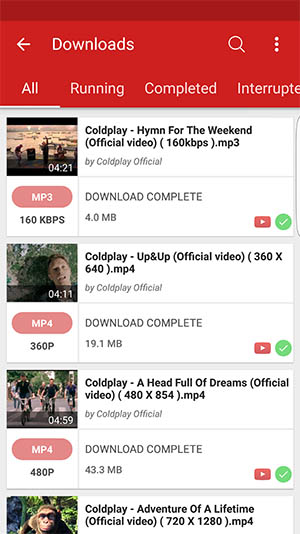
The Best YouTube Video Downloader for Android
Are you looking for a convenient way to download YouTube videos on your Android device? Look no further! With the
right video downloader app, you can easily save your favorite videos for offline viewing. Let’s explore some of
the best YouTube video downloader apps available for Android:
TubeMate
TubeMate is a popular choice among Android users for downloading YouTube videos. It offers fast download speeds
and allows you to choose the video quality before downloading. TubeMate also has a built-in video player for
easy playback.
Snaptube
Snaptube is another reliable video downloader app that supports downloading videos from various platforms,
including YouTube. It features a user-friendly interface and lets you download videos in different resolutions.
Snaptube also allows you to convert videos to MP3 format.
KeepVid
KeepVid is a versatile video downloader app that supports downloading videos from multiple sites, including
YouTube. It offers a simple interface and provides options to download videos in different formats and sizes.
KeepVid also supports batch downloads.
Before using any third-party video downloader app, make sure to check the app’s permissions and reviews to ensure
its safety and reliability. Additionally, be mindful of copyright laws when downloading videos from online
platforms.
With the right YouTube video downloader app on your Android device, you can enjoy your favorite videos anytime,
anywhere, without needing an internet connection. Choose the app that best suits your needs and start building
your offline video library today!
Top 8 Benefits of Using a YouTube Video Downloader for Android
- Convenient way to save videos for offline viewing
- Ability to choose video quality before downloading
- Fast download speeds for quick access to content
- User-friendly interfaces for easy navigation
- Support for downloading videos from various platforms, not just YouTube
- Option to convert videos to different formats like MP3
- Batch download feature for downloading multiple videos at once
- Built-in video player for seamless playback of downloaded content
Potential Risks of Using YouTube Video Downloaders on Android Devices
- Some video downloader apps may violate YouTube’s terms of service, leading to potential account suspension.
- Downloading videos from YouTube without proper authorization may infringe on copyright laws.
- Certain video downloader apps for Android may contain intrusive ads or malware, compromising user privacy and security.
Convenient way to save videos for offline viewing
One of the key advantages of using a YouTube video downloader for Android is the convenience it offers in saving videos for offline viewing. With just a few taps, users can download their favorite YouTube videos directly to their device, allowing them to watch content even when they are not connected to the internet. This feature is especially useful for users who have limited data plans or find themselves in areas with poor network coverage. By having access to offline videos, users can enjoy their preferred content at their convenience, whether they are traveling, commuting, or simply prefer to watch without interruptions.
Ability to choose video quality before downloading
One of the key advantages of using a YouTube video downloader for Android is the ability to select the desired video quality before initiating the download process. This feature allows users to tailor their downloads based on their preferences and device storage capacity. By choosing the appropriate video quality, users can optimize their viewing experience while conserving data usage and storage space on their Android devices. Whether you prefer high-definition videos for a crystal-clear viewing experience or lower resolutions for faster downloads, having the option to customize the video quality enhances flexibility and control over your offline media collection.
Fast download speeds for quick access to content
One of the key advantages of using a YouTube video downloader for Android is the fast download speeds it offers, allowing users to quickly access their desired content. With swift download capabilities, users can save time and effortlessly download videos for offline viewing without experiencing long wait times. This feature enhances the user experience by providing convenient access to content whenever needed, even in areas with limited or no internet connectivity.
User-friendly interfaces for easy navigation
One of the key advantages of YouTube video downloader apps for Android is their user-friendly interfaces, designed for easy navigation. These apps typically feature intuitive layouts and simple controls that make it effortless for users to search for, select, and download their favorite videos with just a few taps. The user-friendly design ensures a seamless experience, allowing even beginners to quickly grasp how to use the app efficiently without any confusion or complications. This accessibility enhances the overall user experience and makes downloading YouTube videos on Android devices a hassle-free task.
Support for downloading videos from various platforms, not just YouTube
One of the key advantages of using a YouTube video downloader for Android is its support for downloading videos from various platforms, not just YouTube. This feature allows users to expand their video library beyond YouTube and download content from other websites or social media platforms. With the ability to download videos from different sources, users can access a wider range of content for offline viewing, making the video downloader app a versatile tool for entertainment and information gathering on their Android devices.
Option to convert videos to different formats like MP3
One key advantage of using a YouTube video downloader for Android is the option to convert videos to different formats like MP3. This feature allows users to extract audio from videos and save them as standalone audio files, making it convenient for listening on the go. By converting videos to MP3 format, users can create personalized music playlists or podcasts from their favorite YouTube content, enhancing the versatility and utility of the downloaded videos. This capability adds an extra layer of functionality to video downloading apps and caters to a wider range of user preferences and needs.
Batch download feature for downloading multiple videos at once
One of the standout advantages of using a YouTube video downloader for Android is the batch download feature, which allows users to download multiple videos simultaneously. This time-saving capability streamlines the downloading process and enables users to build up their offline video library quickly and efficiently. With just a few clicks, users can queue up several videos for download, eliminating the need to download each video individually. The batch download feature enhances convenience and productivity, making it easier for users to access and enjoy their favorite content offline on their Android devices.
Built-in video player for seamless playback of downloaded content
One of the standout features of YouTube video downloader apps for Android is the inclusion of a built-in video player, enhancing the user experience by enabling seamless playback of downloaded content. With this feature, users can easily watch their favorite videos without having to switch between different apps or media players. The built-in video player ensures smooth and uninterrupted playback, allowing users to enjoy their downloaded videos with convenience and ease directly within the downloader app itself.
Some video downloader apps may violate YouTube’s terms of service, leading to potential account suspension.
Using certain video downloader apps on Android to download YouTube videos may pose a significant risk of violating YouTube’s terms of service. By downloading videos without proper authorization, users run the risk of breaching copyright laws and infringing upon content creators’ rights. This unauthorized downloading activity could potentially lead to severe consequences, such as account suspension or termination by YouTube. It is crucial for Android users to be aware of the legal implications and risks associated with using video downloader apps that do not comply with YouTube’s policies to avoid jeopardizing their online presence and access to the platform’s services.
Downloading videos from YouTube without proper authorization may infringe on copyright laws.
Downloading videos from YouTube without proper authorization may infringe on copyright laws. This is a significant concern when using YouTube video downloader apps on Android devices. Unauthorized downloading and distribution of copyrighted content not only violate intellectual property rights but also can lead to legal repercussions. It is essential for users to be aware of the legal implications and respect the rights of content creators by obtaining permission or using legitimate means to access videos online. Adhering to copyright laws is crucial to uphold ethical standards and promote a fair digital environment for creators and users alike.
Certain video downloader apps for Android may contain intrusive ads or malware, compromising user privacy and security.
Certain video downloader apps for Android may pose a risk to user privacy and security due to the presence of intrusive ads or malware. These apps, while offering the convenience of downloading YouTube videos, may come bundled with aggressive advertisements that disrupt the user experience and compromise sensitive information. Moreover, some malicious apps disguised as video downloaders could potentially infect devices with harmful software, leading to data breaches or other security threats. It is crucial for users to exercise caution when selecting a video downloader app and to prioritize their privacy and security by choosing reputable and trustworthy sources for downloading such applications.
Tags: choose video quality, content, convenient way, download speeds, easy navigation, offline viewing, quick access, save videos, user-friendly interfaces, youtube video downloader for android