
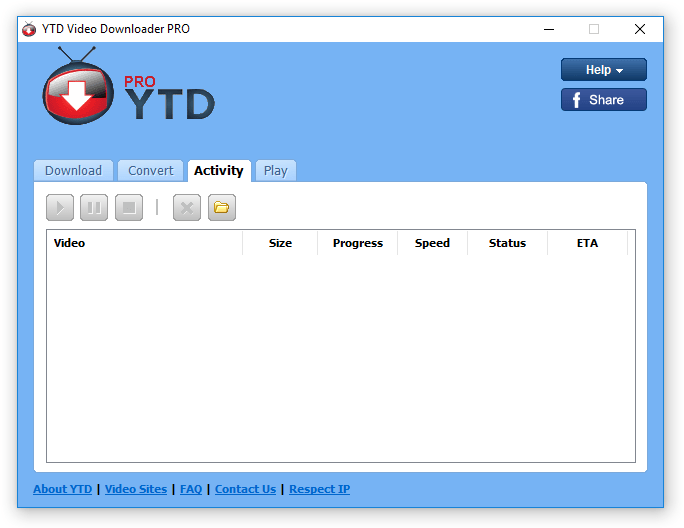
The Ultimate Guide to YTD Downloader
YTD Downloader, short for YouTube Video Downloader, is a popular software tool that allows users to download videos from various online platforms, including YouTube, Facebook, Vimeo, and more. With its user-friendly interface and powerful features, YTD Downloader has become a go-to choice for many individuals looking to save their favorite videos for offline viewing.
Key Features of YTD Downloader:
- Video Downloads: YTD Downloader enables users to easily download videos in different formats and resolutions. Whether you prefer MP4, AVI, WMV, or other file formats, YTD has you covered.
- Batch Downloading: One of the standout features of YTD Downloader is its ability to download multiple videos simultaneously. This time-saving feature allows users to queue up several videos for downloading in one go.
- Conversion Options: In addition to downloading videos, YTD also offers conversion tools. Users can convert downloaded videos into various audio and video formats for playback on different devices.
- Playback Support: YTD Downloader comes with a built-in media player that enables users to preview downloaded videos before saving them to their devices.
- Schedule Downloads: Users can set up schedules for automatic video downloads. This feature is handy for those who want to download specific content at specific times without manual intervention.
How to Use YTD Downloader:
Using YTD Downloader is straightforward and intuitive. Simply follow these steps:
- Download and install the YTD software on your computer.
- Launch the application and navigate to the video you want to download on your preferred platform (e.g., YouTube).
- Copy the video URL from your browser’s address bar.
- Paste the URL into the designated field in the YTD application.
- Select your desired format and resolution options.
- Click the “Download” button to initiate the downloading process.
Congratulations! You have successfully downloaded your favorite video using YTD Downloader. Enjoy watching it offline whenever you want!
In conclusion, YTD Downloader is a versatile tool that simplifies the process of downloading and converting online videos. Whether you are a casual viewer or a content creator looking to save valuable resources, YTD offers a reliable solution with its robust features and user-friendly interface.
Give YTD Downloader a try today and experience the convenience of having your favorite online videos at your fingertips!
Top 9 FAQs About Using YTD Downloader
- Is YTD Downloader free to use?
- Can I download videos from YouTube using YTD Downloader?
- Is it legal to download videos using YTD Downloader?
- Does YTD Downloader work on Mac computers?
- Can I convert downloaded videos into audio files using YTD Downloader?
- How do I update my version of YTD downloader?
- Can I pause and resume downloads in progress?
- Are there any limitations on the number or duration of videos I can download?
- Is it safe to use YTD downloader?
Is YTD Downloader free to use?
One of the most frequently asked questions about YTD Downloader is whether it is free to use. The answer is that YTD Downloader offers both a free version and a paid version with additional features. The free version allows users to download videos from various online platforms, but it may come with limitations such as restricted download speeds or video quality options. On the other hand, the paid version of YTD Downloader typically offers enhanced functionality, including faster download speeds, higher video resolutions, and ad-free usage. Users can choose the version that best suits their needs and preferences based on their video downloading requirements.
Can I download videos from YouTube using YTD Downloader?
Yes, you can download videos from YouTube using YTD Downloader. YTD Downloader is specifically designed to allow users to save videos from various online platforms, including YouTube. With its easy-to-use interface and powerful features, YTD enables users to copy and paste the video URL from YouTube into the application and select their preferred format and resolution for downloading. This makes it convenient for individuals to download their favorite YouTube videos for offline viewing or other purposes. However, it’s important to respect copyright laws and terms of service when downloading content from YouTube or any other platform using YTD Downloader.
Is it legal to download videos using YTD Downloader?
One frequently asked question regarding YTD Downloader is whether it is legal to download videos using this software. The legality of downloading videos using YTD Downloader depends on the content being downloaded and the terms of use of the platform from which the video is being downloaded. While YTD Downloader itself is a tool for downloading videos, it is essential for users to respect copyright laws and only download videos that they have the right to access and save for personal use or with proper permission. It is advisable to review the terms of service of the video-sharing platforms and ensure compliance with copyright regulations when using YTD Downloader or any similar software for downloading online content.
Does YTD Downloader work on Mac computers?
Yes, YTD Downloader is compatible with Mac computers. Mac users can easily download and install YTD Downloader on their devices to enjoy the same powerful features and functionalities available to Windows users. Whether you want to save videos from YouTube, Vimeo, Facebook, or other online platforms, YTD Downloader provides a seamless experience for Mac users looking to download and convert their favorite videos for offline viewing. With its user-friendly interface and reliable performance, YTD Downloader is a versatile tool that caters to the needs of Mac users who wish to access and store online content conveniently.
Can I convert downloaded videos into audio files using YTD Downloader?
Yes, you can convert downloaded videos into audio files using YTD Downloader. One of the convenient features of YTD is its ability to not only download videos but also convert them into various audio formats such as MP3, WAV, AAC, and more. This functionality allows users to extract the audio content from their favorite videos and save them as standalone audio files for listening on music players, smartphones, or other devices. With YTD Downloader, you have the flexibility to enjoy your preferred content in both video and audio formats seamlessly.
How do I update my version of YTD downloader?
To update your version of YTD Downloader, you can follow a simple process. Start by opening the YTD application on your computer. Look for the “Help” or “Settings” option in the menu bar or toolbar. Within these options, you should find an “Update” or “Check for Updates” feature. Click on this option to prompt the software to search for any available updates. If there is a newer version of YTD Downloader available, follow the on-screen instructions to download and install the update. It’s important to keep your software up-to-date to ensure optimal performance and access to new features and improvements.
Can I pause and resume downloads in progress?
Yes, one of the convenient features of YTD Downloader is the ability to pause and resume downloads in progress. This functionality comes in handy when you need to temporarily halt a download and then pick up right where you left off at a later time. Whether you encounter a network interruption, need to prioritize bandwidth for other tasks, or simply want to manage your downloads efficiently, the pause and resume feature in YTD Downloader ensures a seamless and flexible downloading experience for users.
Are there any limitations on the number or duration of videos I can download?
One common frequently asked question about YTD Downloader is whether there are any limitations on the number or duration of videos that can be downloaded using the software. The good news is that YTD Downloader does not impose any restrictions on the number of videos you can download or their duration. Users have the freedom to download as many videos as they want, regardless of their length or quantity. This flexibility makes YTD Downloader a convenient and versatile tool for capturing and saving online videos for offline viewing at your convenience.
Is it safe to use YTD downloader?
Many users often wonder, “Is it safe to use YTD Downloader?” The safety of using YTD Downloader largely depends on where you download the software from and how you use it. When downloaded from the official website or reputable sources, YTD Downloader is generally considered safe to use. However, caution should be exercised when downloading software from third-party sources to avoid potential risks such as malware or adware. It is also important to be mindful of copyright laws when downloading videos using YTD Downloader. By following best practices, such as downloading from trusted sources and respecting intellectual property rights, users can enjoy the benefits of YTD Downloader safely and responsibly.
Tags: audio and video formats, avi, batch downloading, built-in media player, conversion options, conversion tools, download videos, facebook, formats, go-to choice, key features, mp4, multiple videos simultaneously, offline viewing, online platforms, playback support, powerful features, queue up several videos for downloading in one go, resolutions, software tool, ultimate guide, user-friendly interface, vimeo, wmv, youtube video downloader, ytd downloader