
Freemake Video Downloader: Features, How It Works, and What to Know
Freemake Video Downloader is a desktop program for Windows designed to save online videos to a computer. It has attracted users who want a straightforward way to download and manage video files, with options that may include choosing a format or quality before saving.
Online video services regularly change their websites and download policies, so the program’s compatibility and available features can vary over time. Before installing it, check the official Freemake website for current system requirements, supported services, pricing, and download options.
What Is Freemake Video Downloader?
Freemake Video Downloader is a Windows application that can process a video link and, when the source is supported, download the video to a local device. Depending on the version and source, users may be able to select a resolution or output format. Some versions or features may have limitations, so review the software’s current terms before relying on it for a particular task.
How to Use It
- Get the installer from an official source. Avoid unofficial download sites, which may offer outdated or modified installers.
- Review the installation screens. Read each prompt carefully and decline any optional software or settings you do not want.
- Copy the video’s URL. Confirm that you have permission to download the content and that downloading is allowed by the site.
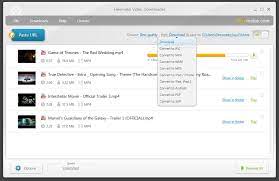
- Paste the link into the application. If the source is supported, the program should display the available download choices.
- Select the format and quality. Higher-resolution files usually take up more storage space.
- Choose a save location and start the download. Check the completed file before moving or sharing it.
Potential Advantages
- Simple workflow: A link-based process can be convenient for users who prefer a desktop interface.
- Local file access: Saving a permitted video can make it available offline or easier to organize.
- Format and quality choices: Available options may help users balance playback compatibility, image quality, and file size.
Limitations and Considerations
Freemake Video Downloader is not a guarantee that every link will work. Video sites may update their systems, restrict downloads, or require users to sign in. Features can also differ by software version, and some options may be limited or require payment. Check the current product information rather than assuming that older reviews describe the version available today.
It is also wise to consider privacy and security when installing any desktop application. Download only from a source you trust, review installation prompts, keep your operating system and security software updated, and avoid entering account credentials into unexpected windows.
Legal and Responsible Use
Downloading a video may violate copyright law, a platform’s terms of service, or both, depending on the content and circumstances. A video being publicly viewable does not automatically mean it can be copied or redistributed. Download only content you own, have permission to save, or are otherwise legally allowed to download. For platform-specific rules, consult the service’s terms and built-in offline viewing options.
Is Freemake Video Downloader Right for You?
Freemake Video Downloader may suit Windows users looking for a familiar desktop tool to save supported videos. Its usefulness depends on the current version, the source site, and the options available to you. If a video platform offers an official download or offline-viewing feature, that is often the simplest and most reliable choice.
Final Thoughts
Freemake Video Downloader offers a link-based approach to saving online videos, but compatibility, features, and terms can change. Check the official product information before installing it, use it cautiously, and make sure any download is permitted by the rights holder and the platform.
Freemake Video Downloader FAQs: Free Features, Safety, and YouTube-to-MP4 Downloads
- How to use Freemake Video Downloader for free?
- Is Freemake Video Downloader still free?
- Is Freemake video downloader safe to use?
- Can Freemake convert YouTube videos to MP4?
- Is Freemake a safe site?
- What is the best free video downloader?
- Is the freemake video downloader still free?
- Is Freemake video free?
- Is Freemake a safe video downloader?
How to use Freemake Video Downloader for free?
To use Freemake Video Downloader for free, download the current version from Freemake’s official website and review the installation prompts carefully, as available features and free-use limits may change. Open the program, copy a link to a video you’re allowed to download, paste it into the app, then choose an available format and quality and select a save location. If the program displays upgrade or optional-offer prompts, check them before proceeding. Some features or downloads may be limited in the free version, and you should follow the video site’s terms and respect copyright rules.
Is Freemake Video Downloader still free?
Freemake Video Downloader has offered a free version, but its features and limitations may vary by version and can change over time. Some options may require payment, so check the current pricing and terms on Freemake’s official website before installing or using the program.
Is Freemake video downloader safe to use?
Freemake Video Downloader may be safe to use when downloaded from the official Freemake website, but no installer should be treated as risk-free. Check that the download source and publisher are legitimate, review each installation prompt for optional software or changed settings, and scan the installer with trusted security software. Avoid unofficial download sites and keep the program and your operating system up to date. Safety can also depend on how you use the tool, so follow the video platform’s terms and download only content you’re legally permitted to save.
Can Freemake convert YouTube videos to MP4?
Freemake Video Downloader may offer MP4 as an output option for supported video links, but availability can vary by software version and YouTube’s changing restrictions. Before downloading or converting a video, check YouTube’s terms and make sure you have permission; use YouTube’s official download or offline-viewing options when available.
Is Freemake a safe site?
Whether Freemake is safe depends on where you download its software and how you install it. Use Freemake’s official website, avoid third-party download links, and read each installation prompt so you can decline any optional offers you don’t want. Keep your security software updated, and check the program’s current privacy policy and terms before using it. No download is entirely risk-free, so stop if the installer or website behaves unexpectedly.
What is the best free video downloader?
The best free video downloader depends on your device, the websites you use, and the features you need. Freemake Video Downloader is one option for Windows users, but its supported sites, features, and free-use limits may change. Before installing any downloader, check its official website for current details, download it only from a trusted source, and review its privacy practices and installation prompts. Whenever possible, use a platform’s built-in download feature, and only save videos you have permission to download.
Is the freemake video downloader still free?
Freemake Video Downloader may still offer a free version, but its features, limits, and pricing can change over time. Some options may require payment or be restricted in the free version, so check Freemake’s official website for the latest details before downloading or installing the software.
Is Freemake video free?
Freemake Video Downloader may be available to download and use at no cost, but free access can come with limitations, such as restricted features, usage limits, or promotional prompts. The exact terms may change, so check Freemake’s official website and the current version’s pricing details before installing or using the software.
Is Freemake a safe video downloader?
Freemake Video Downloader may be safe to use when downloaded from the official Freemake website, but no software is risk-free. Avoid third-party download sites, review every installation prompt for optional offers, and scan the installer with reputable security software. Also check Freemake’s current privacy policy and terms, and remember that a safe installation does not necessarily mean downloading a particular video is permitted by copyright law or the source platform’s rules.
Tags: copyright, freemake video downloader, installation, official download source, offline viewing, online video downloads, privacy and security, responsible use, supported services, system requirements, terms of service, video format, video quality, video url, windows application