
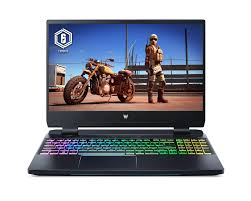
Acer Gaming Laptops: A Guide to Choosing the Right One
Acer gaming laptops offer options for a range of players, from budget-conscious beginners to enthusiasts looking for high-end performance. The company’s gaming lineup includes the more affordable Acer Nitro series and the premium Predator series. Models differ in graphics power, display features, cooling, and price, so comparing the specifications of each configuration is important.
Acer Nitro and Predator: What’s the Difference?
Acer Nitro laptops are generally designed to provide gaming performance at a more accessible price. They can be a practical choice for everyday gaming, schoolwork, and general use. Depending on the model, a Nitro laptop may include a dedicated graphics card, a high-refresh-rate display, and a cooling system built for gaming sessions.
Acer Predator laptops are aimed at players who want more powerful hardware and premium features. Predator models may offer higher-performance processors and graphics cards, more advanced cooling, faster displays, and upgraded designs. These features can make them appealing for demanding games, streaming, and other intensive tasks, though they typically cost more.
What to Look for in an Acer Gaming Laptop
Graphics card
The graphics card, also called the GPU, has a major impact on gaming performance. A more powerful GPU can help run graphically demanding games at higher settings, but it usually increases the laptop’s price and power consumption. Check the exact GPU listed for a configuration rather than relying on the series name alone.
Processor and memory
The processor, or CPU, handles game logic and other computing tasks. A capable modern processor is useful for gaming, multitasking, and content creation. Memory matters too: more RAM can make it easier to run games alongside chat, a browser, or recording software. Requirements vary by game, so compare a laptop’s memory with the titles and applications you plan to use.
Display
Resolution, refresh rate, brightness, and panel quality all affect the experience. A higher refresh rate can make motion appear smoother, especially in fast-paced games. A sharper resolution can improve detail, but it also asks more of the graphics card. Consider the balance between visual quality and the performance needed to run games smoothly.
Cooling and noise
Gaming hardware produces heat, and a laptop’s cooling system helps manage it during demanding workloads. Fan noise and temperature can vary between models and settings. Reviews that test a specific configuration under load can offer useful insight into how it performs during longer gaming sessions.
Storage and ports
Modern games can take up substantial storage space. Check the laptop’s included storage capacity and whether it can be upgraded. Also consider the ports you need for a mouse, headset, external monitor, controller, or other accessories. Port selection varies by model.
Can an Acer Gaming Laptop Be Used for More Than Gaming?
Yes. Acer gaming laptops can also handle everyday tasks such as web browsing, video calls, office applications, and media streaming. Models with stronger processors and graphics cards may also suit video editing, 3D work, and other demanding creative applications. The tradeoffs are that gaming laptops can be heavier, have shorter battery life under load, and use louder fans than many general-purpose laptops.
How to Choose the Right Model
- Set a budget. Decide how much to spend before comparing configurations.
- List the games you play. Check their recommended system requirements and consider the resolution and settings you want.
- Compare the full specifications. Look at the exact CPU, GPU, memory, storage, and display—not just the product family.
- Think about portability. Screen size and laptop weight matter if the computer will travel regularly.
- Check upgrade options and warranty details. Upgradeability and support terms can differ between models and regions.
Final Thoughts
An Acer gaming laptop can be a versatile choice for playing games and handling everyday computing. Acer Nitro models are worth considering for value-focused buyers, while Predator models are designed for users seeking more premium performance and features. The best choice depends on the specific configuration, the games you play, and your budget. Comparing exact specifications and independent reviews can help you find a laptop that fits your needs.
Acer Gaming Laptop FAQs: Best Models, Prices, Battery Life, Upgrades, and Performance
- Which Acer gaming laptop is best for gaming?
- How much does an Acer gaming laptop cost?
- Are Acer Nitro gaming laptops good for gaming?
- How long does an Acer gaming laptop battery last?
- Can you upgrade the RAM and storage in an Acer gaming laptop?
- How do you improve performance on an Acer gaming laptop?
Which Acer gaming laptop is best for gaming?
The best Acer gaming laptop depends on your budget and the games you play. For demanding games and premium features, an Acer Predator Helios model with a powerful graphics card, a fast processor, and a high-refresh-rate display may be a strong choice. If you’re looking for a more affordable option, an Acer Nitro model can offer solid gaming performance for the price. Compare the exact graphics card, processor, memory, and display in each configuration, since specifications vary by model.
How much does an Acer gaming laptop cost?
The cost of an Acer gaming laptop depends on its model and specifications. Budget-friendly Acer Nitro configurations may start around $700, while models with faster graphics, more memory, or premium displays can cost $1,000 to $2,000 or more. High-end Acer Predator laptops may be priced even higher. Prices vary by retailer, region, and sales, so compare the exact configuration and check current listings before buying.
Are Acer Nitro gaming laptops good for gaming?
Yes, Acer Nitro gaming laptops can be a good choice for gaming, especially for players looking for capable performance at a more affordable price. Depending on the model, they may include a dedicated graphics card, a fast-refresh-rate display, and cooling designed for gaming. Performance varies by configuration, so check the specific processor, graphics card, memory, and display before buying to make sure they suit the games you play and the settings you want.
How long does an Acer gaming laptop battery last?
An Acer gaming laptop’s battery life varies by model, battery capacity, and how you use it. Gaming on battery power can drain it quickly—often in just a few hours—because the processor and graphics card use a lot of energy. Everyday tasks such as browsing or watching videos generally last longer, while screen brightness, performance settings, and background apps also affect runtime. For the best gaming performance, keep the laptop plugged in, and check reviews of the specific model for realistic battery-life estimates.
Can you upgrade the RAM and storage in an Acer gaming laptop?
In many Acer gaming laptops, the RAM and storage can be upgraded, but options vary by model. Some have accessible memory slots and an extra M.2 slot, while others may have partially soldered RAM or limited upgrade space. Check the laptop’s exact model number and Acer’s specifications before buying parts, and follow the service instructions to avoid damaging the device or affecting its warranty.
How do you improve performance on an Acer gaming laptop?
To improve performance on an Acer gaming laptop, update Windows, graphics drivers, and Acer’s system software, then select a high-performance power mode while the laptop is plugged in. Close unnecessary background apps, keep games and drivers up to date, and adjust in-game graphics settings—lowering resolution or visual effects can increase frame rates. Make sure the laptop’s vents are clear and use it on a hard, flat surface to support airflow. If the model allows it, adding compatible RAM or storage may also help, but check Acer’s specifications and warranty terms before upgrading.
Tags: acer gaming laptop, acer gaming laptops, acer nitro, acer predator, battery life, budget, cooling system, display, gaming performance, graphics card gpu, independent reviews, portability, ports, processor cpu, ram, refresh rate, storage, system requirements, upgrade options, video editing, warranty