
The Ultimate Guide to GoPro Software
GoPro cameras are known for capturing stunning action-packed footage, but did you know that the software that comes with these cameras can take your editing and sharing capabilities to the next level?
GoPro offers a range of software options that cater to different needs and skill levels. Whether you’re a beginner looking to quickly edit and share your videos or a professional seeking advanced editing tools, there’s a GoPro software solution for you.
GoPro Quik
Quik is GoPro’s free video editing software designed for simplicity and speed. With Quik, you can easily import your footage, choose a theme, add music, and let the software do the rest. Quik automatically edits your clips into a cohesive video with transitions and effects synced to the beat of the music.
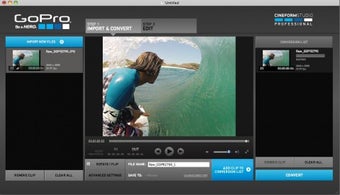
GoPro Studio
For those looking for more control over their edits, GoPro Studio is a powerful desktop editing software that allows for advanced customization. You can trim clips, adjust colors, add text overlays, apply filters, and more. GoPro Studio also supports multi-camera editing for more complex projects.
GoPro App
The GoPro App is a mobile companion that lets you control your camera remotely, view footage on your smartphone or tablet, and easily share content to social media platforms. You can also use the app to create short clips on-the-go or transfer files wirelessly to your device.
Conclusion
Whether you’re looking to create quick highlight reels or dive deep into post-production editing, GoPro has the software tools to help you unleash your creativity and share your adventures with the world.
Top 7 Benefits of GoPro Software: Effortless Editing and Seamless Integration
- User-friendly interface for easy editing
- Automated editing features save time
- Integration with GoPro cameras for seamless workflow
- Support for multi-camera editing in GoPro Studio
- Ability to add music and apply effects effortlessly
- Convenient mobile app for remote camera control and file transfer
- Regular updates and improvements to enhance functionality
7 Drawbacks of GoPro Software: Understanding Its Limitations
- Limited advanced editing features compared to professional editing software
- May experience occasional bugs or crashes
- Some features may be locked behind a paywall or subscription model
- Compatibility issues with certain operating systems or devices
- Steep learning curve for beginners unfamiliar with video editing terminology
- Limited control over fine-tuning adjustments for color correction and audio enhancements
- Export options may be limited in terms of file formats and resolution
User-friendly interface for easy editing
GoPro software stands out with its user-friendly interface, making editing a breeze for users of all skill levels. The intuitive design and straightforward tools allow for easy navigation and quick editing, enabling users to create polished videos without the need for extensive technical knowledge. Whether you’re a beginner looking to trim clips and add music or a seasoned editor seeking efficiency, GoPro software’s user-friendly interface provides a seamless editing experience for all.
Automated editing features save time
One of the standout benefits of GoPro software is its automated editing features that significantly save time for users. With tools like Quik, users can quickly import their footage, choose a theme, add music, and let the software intelligently create a polished video with transitions and effects synced to the beat of the music. This automation not only streamlines the editing process but also allows users to focus more on capturing their adventures while trusting that the software will handle the editing efficiently.
Integration with GoPro cameras for seamless workflow
The seamless integration of GoPro software with GoPro cameras offers users a streamlined workflow that enhances the overall video editing and sharing experience. By connecting directly to the camera, users can easily import footage, access camera settings, and control recording functions right from the software interface. This tight integration ensures a smooth transition from capturing moments to editing and sharing them, allowing users to focus more on their creative process without being bogged down by technical complexities.
Support for multi-camera editing in GoPro Studio
One standout advantage of GoPro Studio is its support for multi-camera editing, allowing users to seamlessly integrate footage from multiple cameras into a single cohesive project. This feature is particularly beneficial for capturing different angles or perspectives of the same event, making it easier to create dynamic and engaging videos. With the ability to synchronize and switch between various camera feeds, GoPro Studio empowers users to produce professional-quality edits that showcase their adventures from every angle.
Ability to add music and apply effects effortlessly
One standout advantage of GoPro software is its seamless ability to add music and apply effects to videos effortlessly. With just a few clicks, users can enhance their footage with the perfect soundtrack and creative effects, enhancing the overall viewing experience. This feature not only saves time but also allows users to easily customize their videos to match their style and vision without the need for advanced editing skills.
Convenient mobile app for remote camera control and file transfer
GoPro’s convenient mobile app offers users the ability to remotely control their cameras and effortlessly transfer files, providing a seamless and efficient way to capture and manage footage. With the app, users can adjust camera settings, start and stop recordings, preview shots in real-time, and even frame their shots using their mobile device as a viewfinder. Additionally, the app allows for quick and easy file transfers from the camera to a smartphone or tablet, enabling users to share their content instantly or edit on-the-go. This feature enhances the overall user experience by offering flexibility and convenience in capturing and managing footage with ease.
Regular updates and improvements to enhance functionality
One significant advantage of GoPro software is its commitment to regular updates and improvements aimed at enhancing functionality. By consistently refining and adding new features to their software, GoPro ensures that users have access to the latest tools and capabilities to elevate their editing and sharing experience. These updates not only address any existing issues but also introduce innovative functionalities that keep pace with evolving technology trends, ultimately providing users with a more seamless and efficient editing process.
Limited advanced editing features compared to professional editing software
One downside of GoPro software is its limited advanced editing features when compared to professional editing software. While GoPro software offers basic editing capabilities that cater to the needs of casual users and enthusiasts, it may lack the robust tools and functionalities required by professional editors for complex projects. Features such as detailed color grading, advanced audio editing, intricate visual effects, and precise timeline control are often more limited in GoPro software compared to industry-standard editing suites. Users with specific requirements for high-level editing may find themselves needing to supplement their workflow with additional software to achieve their desired results.
May experience occasional bugs or crashes
One potential drawback of GoPro software is that users may experience occasional bugs or crashes while using the applications. These technical issues can be frustrating and disrupt the editing or sharing process, leading to delays and potential loss of work. It is important for users to regularly update their software to minimize the occurrence of bugs and crashes, but even with updates, these issues may still arise unexpectedly, impacting the overall user experience.
Some features may be locked behind a paywall or subscription model
One drawback of GoPro software is that some advanced features may be inaccessible unless you opt for a paid subscription or purchase additional add-ons. This can limit the full potential of the software for users who are not willing to invest in these extra costs. It can be frustrating for those looking to access all available editing tools and functionalities without having to pay extra fees on top of the initial camera purchase.
Compatibility issues with certain operating systems or devices
One notable drawback of GoPro software is its compatibility issues with certain operating systems or devices. Users may encounter challenges when trying to run the software on specific platforms, leading to potential frustrations and limitations in accessing the full range of features. This can create barriers for users who rely on different devices or operating systems, impacting their overall experience with GoPro software and potentially hindering their ability to efficiently edit and share their captured footage.
Steep learning curve for beginners unfamiliar with video editing terminology
One notable downside of GoPro software is its steep learning curve, especially for beginners who are unfamiliar with video editing terminology. Navigating through the various features and functions can be daunting for those new to editing, as the software may use technical jargon that requires some level of prior knowledge or experience in video editing. This barrier to entry can be frustrating for users looking to quickly and easily edit their footage without having to invest significant time in learning how to use the software effectively.
Limited control over fine-tuning adjustments for color correction and audio enhancements
One limitation of GoPro software is the restricted control it offers when it comes to fine-tuning adjustments for color correction and audio enhancements. Users may find themselves wanting more precise tools to adjust colors, tones, and audio levels to achieve their desired effects. This lack of detailed control can be frustrating for those looking to perfect their footage with nuanced adjustments for a professional finish.
Export options may be limited in terms of file formats and resolution
One drawback of GoPro software is that the export options may be limited in terms of file formats and resolution. Users may find themselves restricted to exporting their edited videos in specific formats or resolutions, which can be frustrating for those looking for more flexibility in sharing or further editing their footage. This limitation could potentially impact the compatibility of the exported files with different platforms or devices, making it challenging to achieve the desired output quality or meet specific requirements.
Tags: app, automated editing features, cameras, editing, gopro, gopro software, integration, multi-camera editing, quik, seamless workflow, software, studio, user-friendly interface