
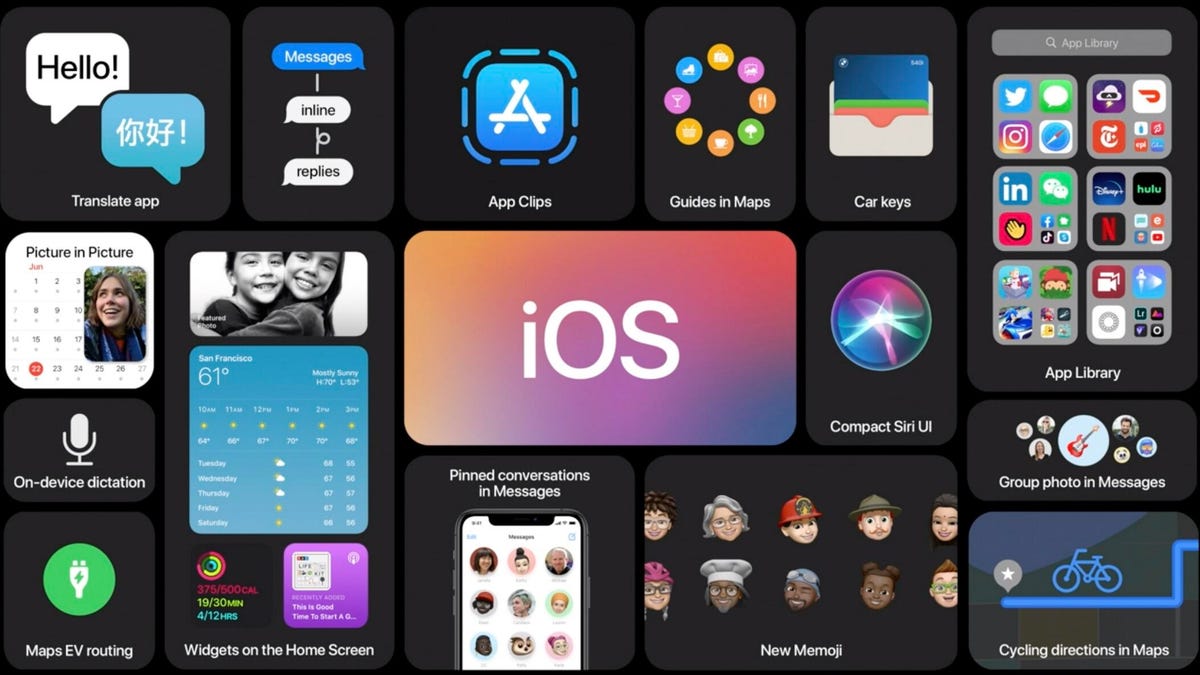
The Latest iPhone Software Updates: What You Need to Know
Apple’s iPhone is known for its sleek design, powerful features, and user-friendly interface. One key aspect that sets the iPhone apart is its software, which plays a crucial role in enhancing the overall user experience.
With each new software update, Apple introduces exciting features, performance improvements, and security enhancements to keep your iPhone running smoothly and securely. Here are some key points about the latest iPhone software updates:
iOS Updates
iOS is the operating system that powers the iPhone. Apple regularly releases iOS updates to introduce new features and address any bugs or security vulnerabilities. It’s important to keep your iPhone up to date with the latest iOS version to ensure optimal performance and security.
Key Features
Each iOS update brings a range of new features that enhance the functionality of your iPhone. From improved camera capabilities to enhanced privacy settings and performance optimizations, there’s always something exciting to look forward to in the latest software updates.
Performance Improvements
Apple focuses on optimizing performance with each new iOS update. Whether it’s faster app launch times, smoother animations, or better battery life management, you can expect your iPhone to run more efficiently with the latest software updates installed.
Security Enhancements
Security is a top priority for Apple, and iOS updates often include important security patches to protect your personal data from potential threats. By staying up to date with the latest software updates, you can ensure that your iPhone remains secure against malware and other cyber threats.
How to Update Your iPhone Software
To check for available software updates on your iPhone, go to Settings > General > Software Update. If a new update is available, follow the on-screen instructions to download and install it on your device. Make sure to back up your data before updating your iPhone software.
Conclusion
Keeping your iPhone software up to date is essential for enjoying all the latest features, performance improvements, and security enhancements that Apple has to offer. By staying informed about the latest software updates and regularly updating your device, you can make the most of your iPhone experience.
8 Essential Tips to Enhance Your iPhone Software Experience
- Regularly update your iPhone software to ensure you have the latest features and security patches.
- Customize your settings to optimize battery life and improve performance.
- Organize your apps into folders to keep your home screen neat and tidy.
- Use iCloud backup to securely store your data and easily restore it if needed.
- Enable Find My iPhone feature to track or remotely erase your device in case it’s lost or stolen.
- Take advantage of Siri for hands-free control and assistance with various tasks.
- Utilize the App Store to discover new apps that can enhance your iPhone experience.
- Clear cache and unnecessary files regularly to free up storage space on your device.
Regularly update your iPhone software to ensure you have the latest features and security patches.
It is crucial to regularly update your iPhone software to stay ahead with the latest features and security patches. By keeping your device up to date, you not only gain access to exciting new functionalities but also ensure that your iPhone remains protected against potential security threats. Regular updates help optimize performance, enhance user experience, and safeguard your personal data, making it essential to prioritize software updates for a seamless and secure iPhone usage.
Customize your settings to optimize battery life and improve performance.
To optimize battery life and enhance performance on your iPhone, customizing your settings is key. By adjusting settings such as screen brightness, background app refresh, location services, and push notifications, you can prolong battery life and ensure smoother operation of your device. Taking the time to fine-tune these settings according to your usage patterns can make a significant difference in how efficiently your iPhone functions throughout the day.
Organize your apps into folders to keep your home screen neat and tidy.
Organizing your apps into folders on your iPhone is a great way to maintain a clean and clutter-free home screen. By categorizing your apps into specific folders based on their functionality or usage, you can easily locate and access them when needed. This simple tip not only helps you stay organized but also allows you to personalize your home screen layout according to your preferences. With a tidy arrangement of folders, you can streamline your app navigation and create a more visually appealing and efficient user experience on your iPhone.
Use iCloud backup to securely store your data and easily restore it if needed.
Utilizing iCloud backup is a smart way to securely store your data on your iPhone and ensure that it’s easily accessible for restoration whenever needed. By enabling iCloud backup, you can safeguard your important files, photos, contacts, and settings by storing them in the cloud. In the event of a device malfunction or data loss, you can conveniently restore your data from iCloud backup, allowing you to get back up and running quickly without losing valuable information.
Enable Find My iPhone feature to track or remotely erase your device in case it’s lost or stolen.
Enabling the Find My iPhone feature on your device is a crucial step in ensuring the security of your device. By activating this feature, you gain the ability to track the location of your iPhone or remotely erase its data in case it goes missing or gets stolen. This added layer of protection not only helps in locating your device but also safeguards your personal information from falling into the wrong hands. It’s a simple yet powerful tool that can provide peace of mind and security for your iPhone.
Take advantage of Siri for hands-free control and assistance with various tasks.
Take advantage of Siri on your iPhone to enjoy hands-free control and convenient assistance with a wide range of tasks. By simply using your voice, you can ask Siri to send messages, set reminders, make calls, play music, get directions, and much more. Siri’s intuitive capabilities make it easy to stay productive and multitask without having to touch your phone. Whether you’re driving, cooking, or simply on the go, Siri is a valuable tool for enhancing your iPhone experience and streamlining everyday tasks.
Utilize the App Store to discover new apps that can enhance your iPhone experience.
Utilize the App Store as a valuable resource to discover new apps that can enhance your iPhone experience. With a vast selection of apps spanning various categories such as productivity, entertainment, health, and more, the App Store offers endless possibilities to customize and optimize your device. Whether you’re looking for innovative tools to boost your productivity or fun games to pass the time, exploring the App Store can help you unlock the full potential of your iPhone and cater to your unique preferences and needs.
Clear cache and unnecessary files regularly to free up storage space on your device.
Regularly clearing cache and unnecessary files on your iPhone is a smart tip to free up storage space on your device. By removing temporary data and unused files, you can optimize your device’s performance and ensure that you have enough space for important apps, photos, and videos. This simple practice can help prevent your iPhone from slowing down due to cluttered storage and improve overall efficiency in managing your digital content.
Tags: battery life, features, folders, home screen, ios, iphone, organize apps, performance improvements, performance optimization, security enhancements, security patches, settings, software updates, update, user experience