
Exploring the Benefits of Recuva Software
Recuva is a popular data recovery software developed by Piriform, a subsidiary of CCleaner. This powerful tool is designed to help users recover deleted files, photos, videos, and other types of data from various storage devices.
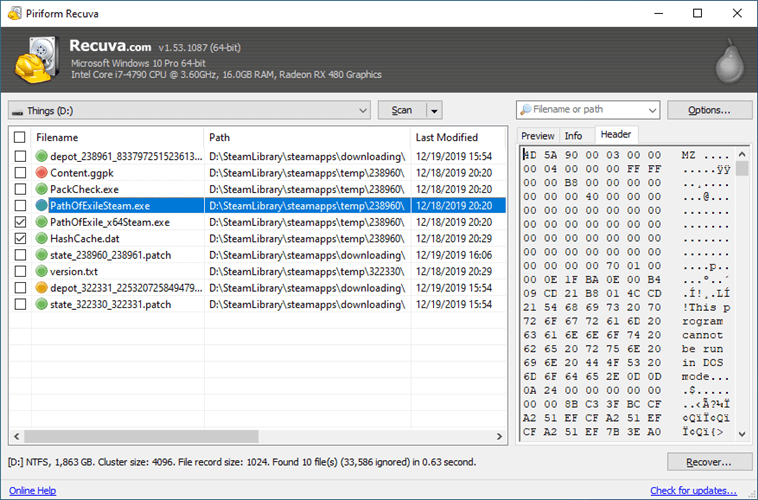
One of the key benefits of Recuva is its user-friendly interface, making it easy for both beginners and advanced users to navigate the recovery process. The software offers different scanning options, including a quick scan for recently deleted files and a deep scan for more thorough recovery.
Recuva supports a wide range of file formats and can recover data from hard drives, USB drives, memory cards, and even iPods. Whether you accidentally deleted important documents or lost precious photos due to a system crash, Recuva can help you retrieve your valuable data.
Another advantage of Recuva is its ability to preview recoverable files before initiating the recovery process. This feature allows users to select specific files they want to restore, saving time and storage space.
Furthermore, Recuva offers secure deletion options to permanently erase sensitive data, ensuring that it cannot be recovered by unauthorized parties. This feature adds an extra layer of protection for users concerned about data privacy.
In conclusion, Recuva is a versatile and reliable tool for recovering lost or deleted data. Its intuitive interface, broad file format support, preview feature, and secure deletion options make it a valuable asset for individuals and businesses alike.
7 Frequently Asked Questions About Using Recuva for Data Recovery
- How does Recuva software work?
- Is Recuva free to use?
- What types of files can Recuva recover?
- Can Recuva recover data from a formatted drive?
- Is Recuva safe to use for recovering sensitive data?
- Does Recuva work on Mac computers?
- What are the differences between the free and paid versions of Recuva?
How does Recuva software work?
Recuva software works by scanning the storage device from which you want to recover data and locating any deleted files that may still be present on the drive. When a file is deleted, it is not immediately removed from the storage device but rather marked as available space for new data. Recuva uses advanced algorithms to search for these “lost” files and attempts to reconstruct them, allowing users to recover and restore their deleted data. The software offers different scanning options, such as quick scan and deep scan, to provide users with flexible recovery solutions based on their specific needs. Additionally, Recuva allows users to preview recoverable files before initiating the recovery process, ensuring they can select and restore only the desired data.
Is Recuva free to use?
Recuva offers both a free version and a paid version with additional features. The free version of Recuva provides basic data recovery functionality, allowing users to recover deleted files from various storage devices. However, certain advanced features, such as virtual hard drive support and automatic updates, are only available in the paid version. Users can choose the option that best suits their needs and budget when considering whether to use Recuva for their data recovery requirements.
What types of files can Recuva recover?
Recuva software is capable of recovering a wide range of file types, including documents, photos, videos, music files, emails, and more. Whether you accidentally deleted an important Word document, lost precious family photos, or formatted a memory card containing your favorite songs, Recuva can help you retrieve these files and many others. Its extensive file format support ensures that users can recover a diverse array of data types from various storage devices with ease.
Can Recuva recover data from a formatted drive?
Yes, Recuva is capable of recovering data from a formatted drive. When a drive is formatted, the operating system marks the storage space as available for new data but does not immediately erase the existing files. Recuva can scan the formatted drive and identify these “lost” files, allowing users to recover them before they are overwritten. By using Recuva’s deep scan feature, users have a higher chance of retrieving data from a formatted drive, making it a valuable tool for data recovery in such scenarios.
Is Recuva safe to use for recovering sensitive data?
When it comes to the question of whether Recuva is safe to use for recovering sensitive data, it is important to consider the software’s features and capabilities. Recuva is a reputable data recovery tool that offers secure deletion options to permanently erase files, providing an added layer of protection for sensitive information. However, as with any data recovery software, there is always a risk of potential data breaches or unauthorized access if not used properly. It is recommended to follow best practices such as using strong encryption methods for sensitive data and ensuring that the recovered files are stored securely. Ultimately, while Recuva can be a valuable tool for recovering sensitive data, users should exercise caution and employ appropriate security measures to safeguard their information effectively.
Does Recuva work on Mac computers?
Recuva is a data recovery software developed specifically for Windows operating systems and does not have a native version compatible with Mac computers. However, Mac users can explore alternative data recovery solutions designed for macOS, such as Disk Drill, EaseUS Data Recovery Wizard for Mac, or Stellar Data Recovery for Mac. These software options offer similar functionalities to Recuva and are tailored to work seamlessly on Mac systems, providing users with the tools they need to recover lost or deleted files effectively.
What are the differences between the free and paid versions of Recuva?
The main differences between the free and paid versions of Recuva lie in the additional features and functionalities offered in the paid version. While the free version of Recuva provides basic data recovery capabilities, such as recovering deleted files from various storage devices, the paid version includes advanced options like priority customer support, automatic updates, and virtual hard drive support. Additionally, the paid version of Recuva may offer faster scan speeds and enhanced file preview capabilities, giving users more control and efficiency in their data recovery efforts. Ultimately, choosing between the free and paid versions depends on individual needs and preferences for data recovery software.
Tags: benefits, ccleaner, data recovery, deleted files, file formats, hard drives, ipods, memory cards, photos, piriform, preview feature, recuva, recuva software, scanning options, secure deletion options, software, storage devices, usb drives, user-friendly interface, videos