
System Software vs. Application Software
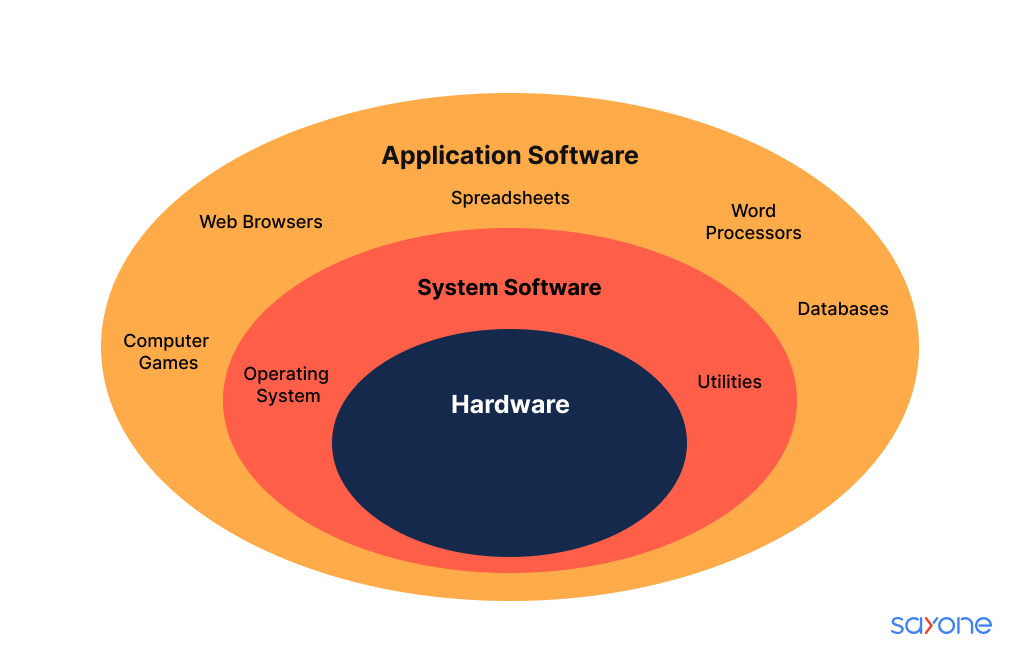
When it comes to the software that runs on your computer, there are two main categories: system software and application software. While both are essential for the functioning of a computer, they serve different purposes and play distinct roles in the overall computing ecosystem.
System Software:
System software is a type of software that provides a platform for running application software and manages the hardware resources of a computer system. It acts as an intermediary between the hardware and the user applications.
Examples of system software include operating systems like Windows, macOS, Linux, and Unix. These operating systems control the basic functions of the computer, such as managing memory, input/output devices, file systems, and other essential tasks.
Application Software:
On the other hand, application software refers to programs designed to perform specific tasks or functions for end-users. Unlike system software, which is essential for running the computer itself, application software is used to achieve particular goals or tasks.
Common examples of application software include word processors like Microsoft Word, web browsers like Google Chrome, graphic design tools like Adobe Photoshop, and video editing software like Adobe Premiere Pro.
Differences:
- Purpose: System software manages computer hardware resources and provides a platform for running applications. Application software performs specific tasks for end-users.
- Interaction: Users interact directly with application software to accomplish tasks. System software operates in the background without direct user interaction.
- Installation: System software is typically installed when setting up a computer system. Application software is installed separately based on user requirements.
- Examples: Windows OS is an example of system software, while Microsoft Office suite is an example of application software.
In conclusion, understanding the distinction between system software and application software is crucial for grasping how computers function and how users interact with them. Both types of software play integral roles in ensuring a seamless computing experience for individuals and organizations alike.
Understanding System and Application Software: Examples, Definitions, and Types
- What is an example of application software?
- What is system software and application software?
- What are 10 examples of system software and application software?
- What are the 4 types of system software?
What is an example of application software?
One common example of application software is Microsoft Office, which includes popular programs like Word for word processing, Excel for spreadsheets, and PowerPoint for presentations. These applications are designed to help users perform specific tasks efficiently and effectively. Microsoft Office is widely used in both personal and professional settings for creating documents, analyzing data, and delivering impactful presentations. Its user-friendly interface and versatile features make it a prime example of application software that enhances productivity and streamlines various work processes.
What is system software and application software?
The question “What is system software and application software?” is a common query among individuals seeking to understand the fundamental components of computer software. System software refers to the foundational programs that manage hardware resources and provide a platform for running applications. Examples include operating systems like Windows and macOS. On the other hand, application software comprises programs designed to perform specific tasks for end-users, such as word processors or web browsers. Distinguishing between system and application software is essential for comprehending how computers operate and how users interact with them effectively.
What are 10 examples of system software and application software?
One frequently asked question regarding system software and application software is: “What are 10 examples of each?” System software examples include operating systems like Windows, macOS, Linux, Unix, and Android. Other system software examples are device drivers, firmware, utility programs, and virtual machine monitors. On the other hand, application software examples encompass a wide range of programs such as Microsoft Office suite (Word, Excel, PowerPoint), Adobe Creative Cloud (Photoshop, Illustrator), web browsers like Google Chrome and Mozilla Firefox, media players like VLC Media Player, antivirus software like Norton and McAfee, and video conferencing tools like Zoom and Skype. These examples showcase the diverse functionalities that both system software and application software offer to users in their computing environments.
What are the 4 types of system software?
One frequently asked question regarding system software is, “What are the 4 types of system software?” System software comprises four main types: operating systems, device drivers, utilities, and firmware. Operating systems like Windows, macOS, Linux, and Unix provide a platform for running applications and managing computer hardware. Device drivers facilitate communication between hardware devices and the operating system. Utilities include tools for managing and optimizing system performance, such as disk cleanup and antivirus software. Firmware refers to low-level programs embedded in hardware components to control their operations. Understanding these four types of system software is essential for comprehending how computers function and interact with users.
Tags: application software, end users, excel, macos, microsoft office, operating systems, powerpoint, programs, system software, system software and application software, tasks, windows, word