
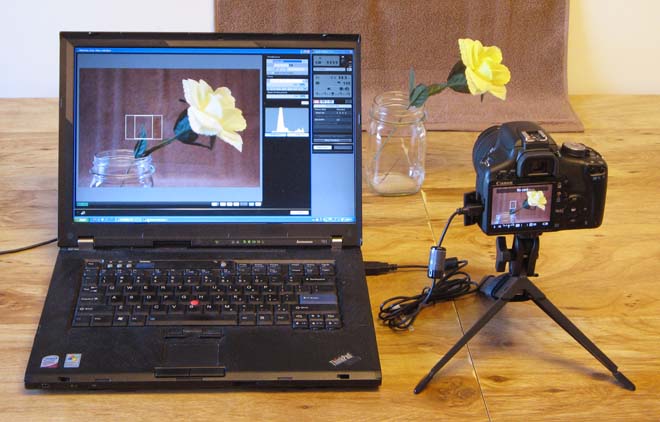
Exploring the Canon EOS Utility Software
The Canon EOS Utility software is a powerful tool designed to enhance your photography experience with Canon cameras. Whether you are a professional photographer or an amateur enthusiast, this software offers a range of features to streamline your workflow and improve your results.
Remote Shooting
One of the key features of the Canon EOS Utility is its remote shooting capability. With this feature, you can control your camera settings and capture images from your computer. This is particularly useful for studio photography, time-lapse shooting, or when working in challenging environments.
Image Transfer
The software also allows for seamless image transfer from your camera to your computer. You can easily download and organize your photos, making it convenient to review and edit your shots without having to remove the memory card from your camera.
Camera Control
In addition to remote shooting and image transfer, the Canon EOS Utility provides comprehensive control over various camera settings. You can adjust parameters such as aperture, shutter speed, ISO, white balance, and focus directly from your computer, giving you greater flexibility and creative control over your photography.
Tethered Shooting
Tethered shooting is another feature that sets the Canon EOS Utility apart. By connecting your camera to your computer via a USB cable, you can instantly view images on a larger screen as they are captured. This real-time feedback is invaluable for ensuring accurate composition and focus in your shots.
Conclusion
The Canon EOS Utility software is a valuable companion for Canon camera users looking to elevate their photography game. With its range of features for remote shooting, image transfer, camera control, and tethered shooting, this software empowers photographers to unleash their creativity and achieve outstanding results.
Mastering Canon EOS Utility: 8 Essential Tips for Remote Camera Control and Creative Photography
- Use Canon EOS Utility to remotely control your camera from your computer.
- Utilize the live view function to see what your camera sees in real time on your computer screen.
- Adjust camera settings such as aperture, shutter speed, and ISO remotely through the utility.
- Capture photos and videos directly to your computer for easier viewing and editing.
- Take advantage of time-lapse shooting capabilities with Canon EOS Utility for creative projects.
- Update your camera’s firmware through the utility to ensure optimal performance and compatibility.
- Use the utility for tethered shooting during studio sessions or when a stable setup is required.
- Explore additional features like focus stacking and HDR merging available in Canon EOS Utility.
Use Canon EOS Utility to remotely control your camera from your computer.
By utilizing the Canon EOS Utility software, you can conveniently take control of your camera remotely from your computer. This feature allows you to adjust settings, capture images, and explore creative possibilities without physically touching the camera. Whether you are conducting a studio shoot, capturing time-lapse sequences, or seeking precise control over your photography setup, the remote control function of Canon EOS Utility enhances your shooting experience by providing flexibility and convenience at your fingertips.
Utilize the live view function to see what your camera sees in real time on your computer screen.
By utilizing the live view function in the Canon EOS Utility software, you can gain real-time insight into what your camera is capturing directly on your computer screen. This feature allows for precise composition and focus adjustments, making it easier to capture the perfect shot without constantly peering through the camera’s viewfinder. Whether you are shooting in a studio setting or outdoors, the live view function provides a convenient way to monitor and adjust your shots with ease and accuracy.
Adjust camera settings such as aperture, shutter speed, and ISO remotely through the utility.
With the Canon EOS Utility, photographers can conveniently adjust essential camera settings like aperture, shutter speed, and ISO remotely through the software. This feature offers a high level of control and flexibility, allowing users to fine-tune their settings without physically touching the camera. Whether capturing images in challenging conditions or experimenting with creative effects, the ability to adjust these key parameters from a distance enhances the shooting experience and opens up new possibilities for achieving the desired results.
Capture photos and videos directly to your computer for easier viewing and editing.
With the Canon EOS Utility software, you can conveniently capture photos and videos directly to your computer, providing a seamless way to view and edit your content. By bypassing the need to transfer files from your camera’s memory card, this feature streamlines your workflow and saves time. Whether you are looking to review images on a larger screen for better detail or edit videos with precision, capturing media directly to your computer offers greater convenience and efficiency in managing your photography and videography projects.
Take advantage of time-lapse shooting capabilities with Canon EOS Utility for creative projects.
Take your creative projects to the next level by leveraging the time-lapse shooting capabilities offered by Canon EOS Utility. With this feature, you can capture a series of images at set intervals and then seamlessly stitch them together to create captivating time-lapse videos. Whether you are documenting a bustling cityscape, a mesmerizing sunset, or the blooming of a flower, incorporating time-lapse photography can add a dynamic element to your visual storytelling. Experimenting with different time intervals and subjects can result in stunning and unique visuals that showcase the passage of time in an engaging way. Embrace the artistic possibilities that time-lapse shooting provides and unlock new dimensions in your photography projects with Canon EOS Utility.
Update your camera’s firmware through the utility to ensure optimal performance and compatibility.
To ensure optimal performance and compatibility with your Canon camera, it is recommended to update the camera’s firmware through the Canon EOS Utility software. Firmware updates often include enhancements, bug fixes, and new features that can improve the overall functionality of your camera. By keeping your camera’s firmware up to date, you can ensure that it operates smoothly and efficiently, allowing you to capture high-quality images and videos without any technical hitches. Regularly checking for firmware updates and applying them through the utility is a simple yet effective way to maximize your camera’s capabilities and maintain its peak performance.
Use the utility for tethered shooting during studio sessions or when a stable setup is required.
Utilizing the Canon EOS Utility for tethered shooting is a smart strategy, especially during studio sessions or when a stable setup is essential. By connecting your camera to your computer and using the software for tethered shooting, you can instantly view and control your images on a larger screen in real-time. This feature is invaluable for ensuring precise composition, focus, and exposure, making it ideal for professional studio photography where accuracy and attention to detail are paramount. Additionally, tethered shooting with the Canon EOS Utility allows for seamless collaboration between photographers and clients by providing immediate feedback on captured images, ultimately leading to more efficient workflows and superior results.
Explore additional features like focus stacking and HDR merging available in Canon EOS Utility.
Explore additional features like focus stacking and HDR merging available in Canon EOS Utility to enhance your photography workflow. These advanced functionalities allow you to create stunning images with increased depth of field and dynamic range. By utilizing focus stacking, you can combine multiple images taken at different focal points to achieve sharpness throughout the entire scene. Similarly, HDR merging enables you to blend multiple exposures to capture a wider range of tones and details in high-contrast scenes. Experimenting with these features in Canon EOS Utility opens up new creative possibilities and helps you take your photography to the next level.
Tags: adjust settings, aperture, camera control, canon eos utility, image transfer, iso, live view function, remote shooting, shutter speed, tethered shooting