
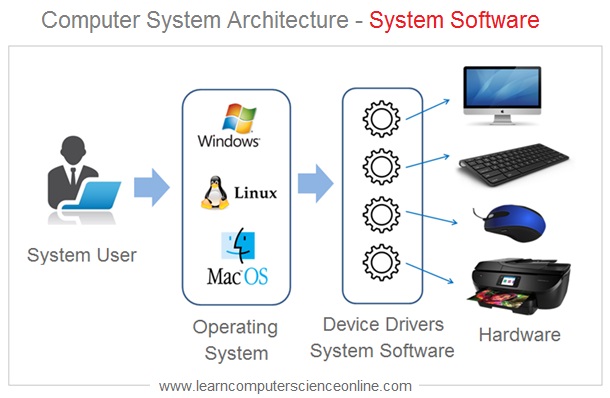
The Importance of System Software
System software plays a crucial role in the operation of a computer system. It acts as an intermediary between the hardware and application software, providing essential functions to ensure the smooth functioning of the entire system.
One of the key functions of system software is managing the hardware components of a computer. This includes tasks such as controlling input and output devices, allocating memory resources, handling interrupts, and managing file systems. Without system software, the hardware components would not be able to communicate effectively with each other.
Another important function of system software is providing a platform for running application software. Operating systems, which are a type of system software, serve as the foundation on which applications can be executed. They manage processes, handle user interactions, and facilitate communication between software programs and hardware devices.
System software also plays a critical role in ensuring the security and stability of a computer system. By implementing security protocols, monitoring system performance, and detecting errors or malfunctions, system software helps protect the integrity of data and prevent unauthorized access to sensitive information.
In addition to these functions, system software often includes utility programs that perform specific tasks such as disk cleanup, antivirus scanning, and driver updates. These utilities help optimize system performance, enhance security measures, and improve overall user experience.
In conclusion, system software is essential for the proper functioning of a computer system. It provides the necessary infrastructure for hardware components to work together harmoniously and enables users to run application software efficiently. By managing resources, ensuring security measures, and enhancing performance capabilities, system software plays a vital role in maximizing the potential of modern computing systems.
Understanding System Software: Key Questions and Answers
- What are the 3 system software?
- What are the 10 examples of system software?
- What is the difference between a system software and an application software?
- What is the definition of a software system?
- What are the 4 types of system software?
- What are the 10 types of system software?
- What are 5 examples of computer system software?
- What are the 5 types of systems?
What are the 3 system software?
System software consists of three main types: operating systems, device drivers, and utility software. Operating systems serve as the core software that manages computer hardware and provides a platform for running application programs. Device drivers are specialized software that allow the operating system to communicate with hardware devices such as printers, scanners, and graphics cards. Utility software includes tools like antivirus programs, disk cleanup utilities, and backup software that help optimize system performance and enhance user experience. Together, these three types of system software work in harmony to ensure the efficient operation of a computer system.
What are the 10 examples of system software?
When discussing system software, it is common to inquire about examples that illustrate its importance in the realm of computing. Ten notable examples of system software include operating systems like Windows, macOS, and Linux, which serve as the foundation for running applications. Device drivers play a crucial role in facilitating communication between hardware devices and the operating system. Utility programs such as antivirus software, disk management tools, and backup utilities help optimize system performance and ensure data security. Additionally, programming languages like Java and C++ are essential tools for developing system software itself. System software also encompasses firmware that controls hardware components at a low level, as well as virtual machine managers that enable multiple operating systems to run on a single physical machine. These diverse examples showcase the breadth and significance of system software in modern computing environments.
What is the difference between a system software and an application software?
System software and application software are two distinct categories of programs that serve different purposes in the realm of computing. System software refers to the foundational programs that manage and control the hardware components of a computer system, providing essential functions such as managing memory, handling input/output operations, and facilitating communication between software and hardware. On the other hand, application software is designed to perform specific tasks or functions for end-users, such as word processing, graphic design, or web browsing. While system software acts as an intermediary between hardware and applications, ensuring the smooth operation of the entire system, application software is tailored to meet users’ diverse needs and preferences. In essence, system software lays the groundwork for the computer system to function effectively, while application software allows users to accomplish various tasks and activities based on their requirements.
What is the definition of a software system?
A software system, also known as system software, refers to a collection of programs, routines, and functions that manage and control the operations of a computer system. It serves as a bridge between the hardware components of a computer and application software, providing essential functionalities such as managing resources, facilitating communication between software programs and hardware devices, and ensuring the overall stability and security of the system. In essence, a software system acts as the backbone of a computer system, enabling it to perform various tasks efficiently and effectively.
What are the 4 types of system software?
System software consists of essential programs that facilitate the operation of a computer system. When it comes to the types of system software, there are four main categories that play distinct roles in ensuring the functionality and performance of a computer. These include operating systems, device drivers, utilities, and firmware. Operating systems serve as the core software that manages hardware resources and provides a platform for running applications. Device drivers enable communication between hardware devices and the operating system. Utilities consist of tools for system maintenance, optimization, and security. Firmware refers to low-level programs embedded in hardware components to control their operations. Each type of system software plays a critical role in supporting the overall operation of a computer system.
What are the 10 types of system software?
When it comes to system software, understanding the various types is essential for optimizing computer performance and functionality. The 10 types of system software commonly recognized include operating systems, device drivers, firmware, utilities, compilers, interpreters, linkers, loaders, text editors, and debuggers. Each type serves a specific purpose in managing hardware components, facilitating communication between software programs and devices, and enhancing overall system efficiency. By familiarizing oneself with these different types of system software, users can make informed decisions to ensure their computer systems operate smoothly and effectively.
What are 5 examples of computer system software?
Computer system software comprises essential programs that facilitate the operation of a computer system. Five examples of system software include the operating system (such as Windows, macOS, or Linux), device drivers (software that enables communication between hardware devices and the operating system), utility programs (like antivirus software, disk cleanup tools, and backup utilities), firmware (software embedded in hardware devices to control their functionalities), and virtual machine monitors (software that allows multiple operating systems to run on a single physical machine). These components work together to ensure the smooth functioning and optimal performance of a computer system.
What are the 5 types of systems?
When discussing the types of systems, it is important to consider the various categories that encompass different aspects of technology and organizational structures. The five types of systems commonly referred to include information systems, communication systems, control systems, expert systems, and management information systems. Information systems focus on managing data and facilitating decision-making processes. Communication systems enable the exchange of information between individuals or devices. Control systems regulate and monitor the behavior of other systems or processes. Expert systems utilize artificial intelligence to mimic human expertise in specific domains. Management information systems help organizations collect, process, and analyze data to support managerial decision-making. Each type of system serves a distinct purpose in enhancing efficiency and effectiveness within different contexts.
Tags: device drivers, operating systems, system software, utility software