
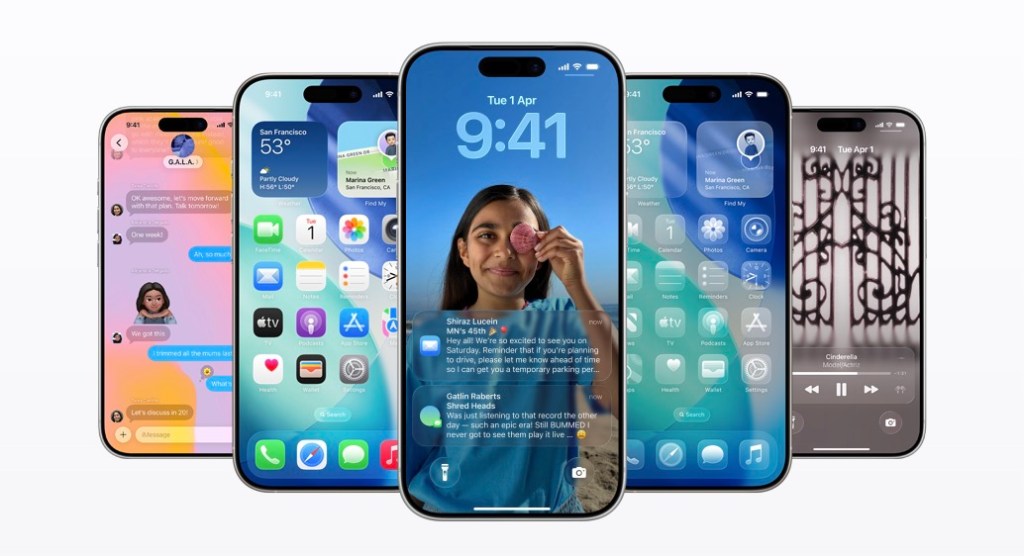
The World of Apple Software
Apple Inc. is renowned for its innovative hardware, but its software ecosystem is equally impressive. From operating systems to productivity apps, Apple software plays a crucial role in enhancing user experience across its range of devices.
iOS – Powering iPhones and iPads
iOS, Apple’s mobile operating system, is the heart of iPhones and iPads. Known for its sleek design and intuitive interface, iOS offers a seamless user experience with features like Face ID, Siri, and the App Store. Regular updates ensure security and performance improvements, keeping Apple devices at the forefront of mobile technology.
macOS – The Operating System for Mac
macOS powers Mac computers with its elegant interface and powerful capabilities. Features like Siri, iCloud integration, and Continuity make it easy to work across multiple Apple devices. macOS updates bring new features and enhancements to improve productivity and creativity for Mac users.
iPadOS – Optimized for iPad Productivity
iPadOS is tailored specifically for the iPad, offering features that take advantage of the device’s large screen and versatility. Multitasking capabilities, Apple Pencil support, and widgets enhance productivity on the iPad, making it a valuable tool for work and creativity.
Apple Apps – Enhancing User Experience
Apple’s suite of apps complements its hardware products seamlessly. From Safari for browsing to Pages for document creation and GarageBand for music production, Apple apps are designed to provide a cohesive user experience across devices.
Developer Tools – Empowering Creativity
Xcode, Swift, and other developer tools from Apple empower creators to build innovative apps for the Apple ecosystem. The robust development environment enables developers to bring their ideas to life and reach millions of users through the App Store.
Top 6 Advantages of Apple Software: Intuitive Design, Seamless Integration, and More
- Sleek and intuitive user interface for a seamless experience.
- Regular software updates for enhanced security and performance.
- Seamless integration across Apple devices for effortless workflow.
- Robust selection of productivity apps to boost efficiency and creativity.
- Developer tools that empower creators to build innovative applications.
- Industry-leading design standards that prioritize functionality and user experience.
Challenges of Apple Software: Customization Limits, Cost Concerns, and Compatibility Issues
- Limited customization options compared to other platforms
- Higher price point for Apple devices and software
- Some software updates may lead to compatibility issues with older hardware
Sleek and intuitive user interface for a seamless experience.
Apple software is lauded for its sleek and intuitive user interface, which ensures a seamless experience for users across its range of devices. The carefully crafted design elements and user-friendly interactions make navigating through Apple software a delight. Whether on iOS, macOS, or iPadOS, the intuitive interface enhances usability and simplifies complex tasks, allowing users to focus on their work or entertainment without distractions. Apple’s commitment to providing a visually appealing and easy-to-use interface sets a high standard in the tech industry, making their software a preferred choice for those seeking a polished and efficient digital experience.
Regular software updates for enhanced security and performance.
Apple’s commitment to providing regular software updates for enhanced security and performance sets a high standard in the tech industry. By consistently releasing updates for its operating systems and apps, Apple ensures that its users are protected against emerging threats and vulnerabilities. These updates not only strengthen the security of Apple devices but also improve overall performance, introducing new features and optimizations that enhance user experience. The proactive approach to software updates demonstrates Apple’s dedication to keeping its software ecosystem safe, reliable, and up-to-date for all users.
Seamless integration across Apple devices for effortless workflow.
Apple software excels in providing seamless integration across its range of devices, allowing users to experience effortless workflow transitions. Whether moving from an iPhone to a Mac or using an iPad alongside an Apple Watch, the interconnected ecosystem ensures a consistent and smooth user experience. Features like Handoff, AirDrop, and iCloud synchronization enable users to seamlessly switch between devices without missing a beat, enhancing productivity and convenience in their daily tasks. This level of integration sets Apple software apart, creating a cohesive environment where users can easily access their content and continue their work across different Apple products with ease.
Robust selection of productivity apps to boost efficiency and creativity.
Apple software offers a robust selection of productivity apps that cater to diverse user needs, enhancing both efficiency and creativity. From Pages for document creation to Keynote for presentations and GarageBand for music production, Apple’s suite of apps provides powerful tools to streamline tasks and unleash creative potential. With intuitive interfaces and seamless integration across devices, these productivity apps empower users to work smarter, collaborate effectively, and express their ideas with precision and flair. Whether in the office, classroom, or studio, Apple software enables users to achieve more and unlock new levels of productivity and innovation.
Developer tools that empower creators to build innovative applications.
Apple’s developer tools stand out as a pro of its software ecosystem, empowering creators to unleash their creativity and build innovative applications. With tools like Xcode and Swift, developers have access to a robust development environment that streamlines the app creation process. These tools not only simplify coding but also offer advanced features and resources to bring unique ideas to life. By providing a platform for developers to showcase their talents and reach a global audience through the App Store, Apple software fosters a culture of innovation and enables creators to make a meaningful impact in the tech industry.
Industry-leading design standards that prioritize functionality and user experience.
Apple software sets itself apart with industry-leading design standards that prioritize functionality and user experience. From the intuitive interfaces of iOS and macOS to the seamless integration of Apple apps across devices, every aspect of Apple software is meticulously crafted to enhance usability and delight users. By focusing on elegant design elements and intuitive workflows, Apple ensures that its software not only looks beautiful but also works flawlessly, setting a high bar for the industry as a whole.
Limited customization options compared to other platforms
One notable drawback of Apple software is its limited customization options when compared to other platforms. While Apple devices offer a seamless and user-friendly experience out of the box, users have less flexibility to personalize their devices according to their preferences. Customization options such as changing system fonts, adjusting advanced settings, or installing third-party apps that deeply integrate with the operating system may be restricted on Apple devices. This lack of extensive customization can be a downside for users who prefer more control over the look and functionality of their devices, as it may limit their ability to tailor the user experience to suit their individual needs and preferences.
Higher price point for Apple devices and software
The higher price point associated with Apple devices and software can be a significant drawback for many consumers. Apple products are known for their premium quality and innovative features, but the cost of ownership can be a barrier for budget-conscious individuals. The initial investment required to purchase Apple hardware and software may deter some users from accessing the benefits of the Apple ecosystem. This pricing strategy can limit the accessibility of Apple products to a more affluent demographic, potentially excluding those who cannot afford the premium price tag.
Some software updates may lead to compatibility issues with older hardware
Some users have experienced a downside of Apple software updates, as certain updates may inadvertently lead to compatibility issues with older hardware. This can be frustrating for individuals who rely on their existing devices but find that newer software versions may not run smoothly or may even render certain features unusable. As technology advances, the challenge of balancing innovation with backward compatibility poses a significant concern for users who wish to extend the lifespan of their older Apple devices while still benefiting from the latest software enhancements.
Tags: apple apps, apple software, developer tools, intuitive interface, ios, ipados, macos, performance improvements, regular updates, seamless experience, security, user experience