
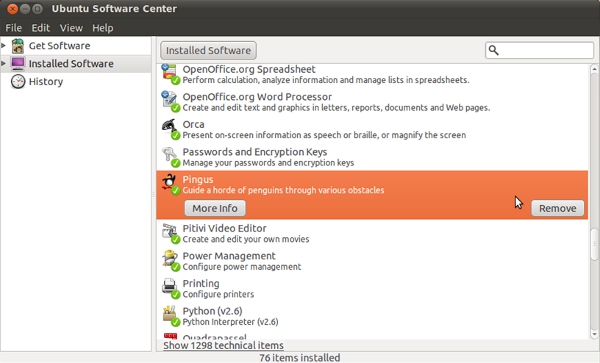
The Ubuntu Software Center: Your Gateway to Software on Ubuntu
If you are a user of Ubuntu, one of the most popular Linux-based operating systems, you are likely familiar with the Ubuntu Software Center. This centralized hub is where users can discover, install, and manage a wide range of software applications for their Ubuntu system.
One of the key features of the Ubuntu Software Center is its user-friendly interface, which makes it easy for both beginners and experienced users to navigate and find the software they need. The software available in the center covers a diverse range of categories, including productivity tools, multimedia apps, games, development software, and more.
Searching for software in the Ubuntu Software Center is simple – users can either browse through categories or use the search bar to find specific applications. Each software listing includes a description, user ratings and reviews, screenshots, and other relevant information to help users make informed decisions.
Installing software from the Ubuntu Software Center is as easy as clicking a button. The center handles all dependencies and installation processes automatically, making it convenient for users to add new software to their system without worrying about technical details.
In addition to installing new software, the Ubuntu Software Center also helps users manage their existing applications. Users can view installed software, update them to newer versions if available, remove unwanted applications, and even reinstall previously uninstalled programs with ease.
Overall, the Ubuntu Software Center plays a crucial role in enhancing the user experience on Ubuntu by providing a centralized platform for discovering and managing software. Whether you are looking for essential productivity tools or fun games to pass the time, the center has something for everyone.
So next time you need to install new software on your Ubuntu system or update existing applications, be sure to explore the wealth of options available in the Ubuntu Software Center – your gateway to a world of software possibilities!
5 Essential Tips for Maximizing Your Ubuntu Software Center Experience
- Use the search bar to quickly find specific software.
- Check user reviews and ratings to make informed decisions about software.
- Explore different software categories for a variety of options.
- Update software regularly to ensure security and performance improvements.
- Consider exploring third-party repositories for additional software choices.
Use the search bar to quickly find specific software.
When using the Ubuntu Software Center, a helpful tip is to utilize the search bar to swiftly locate specific software. By entering keywords or the name of the desired application into the search bar, users can efficiently narrow down their search results and easily find the software they are looking for without having to browse through multiple categories. This time-saving feature streamlines the process of discovering and installing software on Ubuntu, making it convenient for users to access their desired applications with just a few keystrokes.
Check user reviews and ratings to make informed decisions about software.
When using the Ubuntu Software Center, it is advisable to check user reviews and ratings before installing any software. By reviewing feedback from other users, you can gain valuable insights into the performance, usability, and reliability of a particular application. User reviews help you make informed decisions about software, allowing you to choose programs that have been positively reviewed by the community. This practice can help ensure that you select high-quality software that aligns with your needs and preferences while avoiding potential issues or disappointments.
Explore different software categories for a variety of options.
When using the Ubuntu Software Center, it’s beneficial to explore different software categories to discover a variety of options tailored to your needs. By delving into various categories such as productivity tools, multimedia apps, games, and development software, you can uncover a diverse range of applications that cater to different interests and requirements. This approach not only helps you find specific software more efficiently but also introduces you to new programs that you may not have considered before. Embracing the exploration of different categories within the Ubuntu Software Center opens up a world of possibilities and ensures that you make the most out of your software selection experience.
Update software regularly to ensure security and performance improvements.
To maintain the security and performance of your Ubuntu system, it is crucial to update software regularly through the Ubuntu Software Center. By staying current with updates, you can ensure that your applications are equipped with the latest security patches and performance enhancements. Regular updates not only help protect your system from potential vulnerabilities but also optimize the functionality of your software, providing a smoother and more efficient user experience. Remember, keeping your software up-to-date is a proactive measure to safeguard your system and enjoy the benefits of improved performance on Ubuntu.
Consider exploring third-party repositories for additional software choices.
For users looking to expand their software options on Ubuntu, a helpful tip is to consider exploring third-party repositories. These repositories offer additional software choices beyond what is available in the official Ubuntu Software Center. By adding third-party repositories to your system, you can access a wider range of applications, tools, and updates that may not be included in the default software sources. This can be particularly useful for users seeking niche or specialized software that caters to specific needs or interests. Just be sure to exercise caution and verify the credibility of third-party repositories to ensure the safety and integrity of your Ubuntu system.
Tags: categories, dependencies, development software, games, installation processes, manage applications, multimedia apps, productivity tools, search bar, software, ubuntu, ubuntu software center, update software, user experience, user ratings and reviews, user-friendly interface