
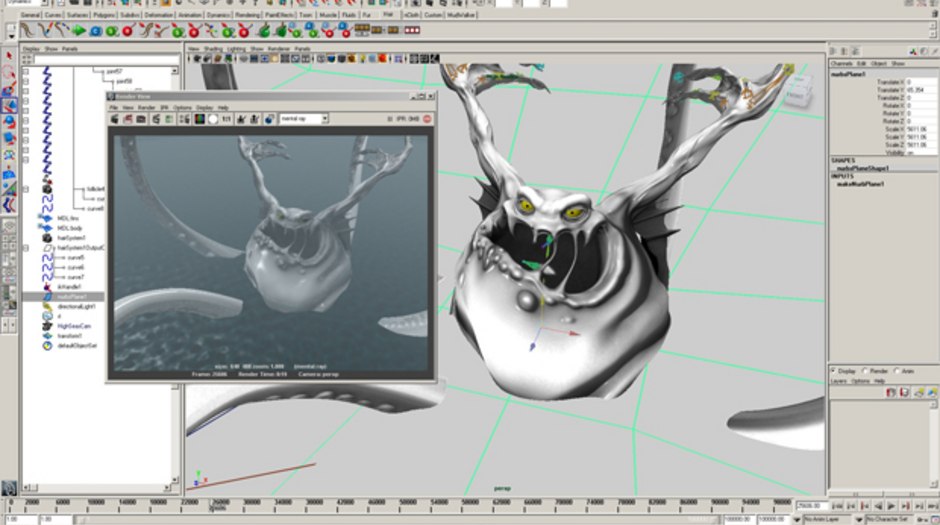
The Magic of Maya Software
Maya software is a powerful tool used by professionals in the film, animation, and gaming industries to create stunning visual effects and realistic 3D animations. Developed by Autodesk, Maya has become a standard in the world of computer-generated imagery (CGI) due to its robust features and versatility.
Key Features of Maya Software:
- Modeling: Maya offers a wide range of tools for creating intricate 3D models with precision and ease.
- Animation: With advanced rigging and keyframe animation capabilities, Maya allows animators to bring characters and objects to life.
- Rendering: The software’s rendering engine produces high-quality images and animations that meet industry standards.
- Simulation: Maya enables users to simulate realistic physics-based effects such as fluid dynamics, cloth simulation, and particle systems.
- Scripting: For advanced users, Maya provides scripting tools for automation and customization of workflows.
Applications of Maya Software:
Maya is widely used in various industries for creating visual content that captivates audiences. Here are some common applications of Maya software:
- Film Production: From blockbuster movies to indie films, Maya is used to design breathtaking visual effects that enhance storytelling on the big screen.
- Animation Studios: Animation studios leverage Maya’s capabilities to produce animated shorts, TV shows, and feature films with lifelike characters and immersive environments.
- Gaming Industry: Game developers rely on Maya for creating detailed character models, realistic environments, and engaging animations in video games.
- Architectural Visualization: Architects and designers use Maya to visualize architectural projects in 3D, allowing clients to experience virtual walkthroughs of proposed designs.
In Conclusion
Maya software continues to push the boundaries of creativity and innovation in digital content creation. Its intuitive interface, powerful tools, and extensive capabilities make it an essential tool for artists, designers, and creators worldwide. Whether you are a seasoned professional or an aspiring artist, exploring the world of Maya can unlock endless possibilities for your creative endeavors.
Top 6 Advantages of Using Maya Software for 3D Modeling and Animation
- Advanced modeling tools for creating intricate 3D models.
- Robust animation features for bringing characters and objects to life.
- High-quality rendering engine for producing realistic images and animations.
- Simulation capabilities for creating physics-based effects like fluid dynamics and particle systems.
- Scripting tools for automation and customization of workflows.
- Widely used in film, animation, gaming, and architectural visualization industries.
Challenges of Using Maya Software: High Learning Curve, Cost, Resource Demand, and Compatibility Issues
Advanced modeling tools for creating intricate 3D models.
Maya software stands out for its advanced modeling tools that empower users to craft intricate 3D models with precision and detail. Whether designing complex characters, architectural structures, or intricate props, Maya’s robust modeling features provide artists and designers with the flexibility and control needed to bring their creative visions to life in stunning three-dimensional form. By offering a wide range of tools and techniques for sculpting, shaping, and refining 3D objects, Maya enables users to push the boundaries of their imagination and achieve unparalleled levels of realism and sophistication in their digital creations.
Robust animation features for bringing characters and objects to life.
Maya software boasts robust animation features that excel in bringing characters and objects to life with unparalleled realism and fluidity. With advanced rigging tools and keyframe animation capabilities, Maya empowers animators to infuse personality, emotion, and movement into their creations. Whether it’s crafting dynamic character movements or animating intricate object interactions, Maya provides a versatile platform for breathing life into digital creations with precision and creativity.
High-quality rendering engine for producing realistic images and animations.
Maya software boasts a high-quality rendering engine that excels in producing lifelike images and animations. This advanced feature enables users to create visually stunning and realistic visual effects with exceptional detail and depth. Whether it’s crafting intricate 3D models, designing immersive environments, or animating dynamic scenes, Maya’s rendering capabilities elevate the quality of the final output, making it a preferred choice for professionals in the film, animation, and gaming industries seeking unparalleled realism in their projects.
Simulation capabilities for creating physics-based effects like fluid dynamics and particle systems.
Maya software’s simulation capabilities are a game-changer for creators looking to achieve realistic physics-based effects in their projects. With features tailored for fluid dynamics and particle systems, Maya empowers users to simulate intricate movements and interactions with unparalleled accuracy. Whether it’s creating dynamic water simulations or intricate particle effects, Maya’s advanced tools provide a versatile platform for artists and animators to bring their visions to life with stunning realism and precision.
Scripting tools for automation and customization of workflows.
One of the standout advantages of Maya software is its robust scripting tools that enable users to automate repetitive tasks and customize workflows to suit their specific needs. By harnessing the power of scripting, users can streamline their workflow processes, increase efficiency, and unlock new levels of creativity. Whether it’s creating custom tools, automating complex animations, or integrating external plugins, Maya’s scripting capabilities empower users to take control of their projects and achieve unprecedented levels of productivity.
Widely used in film, animation, gaming, and architectural visualization industries.
Maya software’s widespread adoption across the film, animation, gaming, and architectural visualization industries underscores its versatility and effectiveness in meeting the diverse needs of creative professionals. In film and animation, Maya’s robust features empower artists to craft visually stunning effects and lifelike animations that captivate audiences. For game developers, Maya serves as a vital tool for creating immersive worlds and dynamic characters in video games. Additionally, architects and designers benefit from Maya’s capabilities in visualizing architectural projects with precision and realism. The software’s seamless integration into multiple industries highlights its adaptability and reliability as a go-to solution for 3D modeling, animation, and simulation needs.
Steep Learning Curve
One notable drawback of Maya software is its steep learning curve, which can pose a significant challenge for beginners. The complexity and depth of Maya’s features may initially overwhelm new users, necessitating a considerable investment of time and effort to grasp its advanced functionalities. From intricate modeling tools to complex animation techniques, mastering Maya requires dedication and patience to navigate through its sophisticated interface and workflows. Despite the initial learning curve, the rewards of unlocking Maya’s full potential can lead to unparalleled creativity and professional growth in the field of 3D design and animation.
High Cost
One notable drawback of Maya software is its high cost, making it a premium tool with a substantial price tag that may not be feasible for individual users or small studios. The investment required to purchase Maya licenses and maintain updates can pose a financial challenge, especially for independent artists or startup companies operating on limited budgets. This cost barrier may limit access to Maya’s advanced features and capabilities, potentially hindering smaller creators from fully leveraging the software’s potential for their projects.
Resource Intensive
One significant drawback of Maya software is its resource-intensive nature. To run Maya smoothly, users often need powerful hardware specifications, which can result in high system requirements. This can pose challenges for individuals with less capable machines, leading to potential performance issues such as lagging, slow rendering times, and overall decreased efficiency. The demanding nature of Maya’s operations may require users to invest in upgraded hardware to fully leverage the software’s capabilities, making it less accessible for those with limited resources or older computer systems.
Limited Compatibility
One significant drawback of Maya software is its limited compatibility, which can hinder seamless collaboration on projects. Although Maya supports a range of file formats, issues may arise when trying to integrate it with other software tools or platforms. This lack of interoperability can create obstacles for teams working together on projects, potentially leading to delays and inefficiencies in the workflow. Overcoming these compatibility challenges requires careful planning and possibly additional resources to ensure smooth communication and data exchange between different systems.
Tags: 3d animations, animation, animation studios, applications, architectural visualization, autodesk, computer-generated imagery cgi, features, film, film production, gaming industries, gaming industry, maya software, modeling, power, rendering, scripting, simulation, visual effects