
The Power of Webcam Software: Enhancing Your Video Experience
Webcam software has revolutionized the way we communicate and collaborate in the digital age. Gone are the days of grainy,
low-quality video feeds – with the right webcam software, you can enhance your video experience and take it to the next level.
Enhanced Features
Modern webcam software comes packed with a variety of features that allow you to customize your video settings, add special
effects, and improve overall video quality. From adjusting brightness and contrast to applying filters and overlays,
webcam software gives you full control over how you present yourself in video calls, live streams, or recordings.
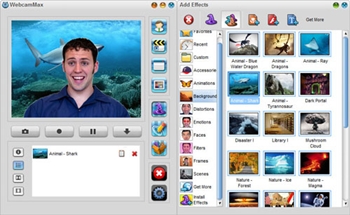
Virtual Backgrounds
One popular feature of webcam software is the ability to use virtual backgrounds. Whether you want to hide a messy room
or add a touch of professionalism to your video calls, virtual backgrounds allow you to transport yourself to any
setting with just a few clicks. This feature is not only fun but also practical for maintaining privacy and enhancing
visual appeal.
Facial Recognition
Some advanced webcam software utilizes facial recognition technology to enhance user experience. By tracking facial movements
and expressions, this feature can add interactive elements such as animated emojis or augmented reality effects to
your video feed. Facial recognition technology not only adds a fun element to your videos but also opens up new possibilities
for creative expression.
Security and Privacy
When choosing webcam software, it’s essential to prioritize security and privacy. Look for software that offers encryption,
password protection, and other security features to ensure that your video feed remains private and secure. Additionally,
be mindful of permissions granted to the software and adjust settings accordingly to protect your personal information.
Conclusion
Webcam software has come a long way in providing users with tools to enhance their video experience. Whether you’re looking
to improve video quality, customize your appearance, or add creative elements to your videos, webcam software offers
endless possibilities for personalization and innovation. Embrace the power of webcam software and elevate your digital
communication today!
6 Essential Tips for Optimizing Your Webcam Software Experience
- Ensure your webcam software is up to date to access the latest features and improvements.
- Adjust the camera settings such as brightness, contrast, and resolution for better video quality.
- Explore additional features like filters, effects, and virtual backgrounds to enhance your video calls.
- Check privacy settings to control who can access your webcam and ensure your security.
- Test your webcam before important calls to avoid technical issues during meetings.
- Consider using third-party webcam software for advanced functionalities not available in built-in programs.
Ensure your webcam software is up to date to access the latest features and improvements.
To make the most of your webcam experience, it is crucial to ensure that your webcam software is kept up to date. By regularly updating your webcam software, you not only gain access to the latest features but also benefit from improvements in performance and security. Staying current with updates ensures that you can take advantage of new functionalities, enhancements, and bug fixes that can enhance your video calls, live streams, and recordings. Keeping your webcam software up to date is a simple yet effective way to optimize your video experience and stay ahead in the ever-evolving world of technology.
Adjust the camera settings such as brightness, contrast, and resolution for better video quality.
To enhance the quality of your video feed, a helpful tip is to adjust the camera settings such as brightness, contrast, and resolution. By fine-tuning these settings in your webcam software, you can significantly improve the clarity and overall visual appeal of your video. Adjusting the brightness and contrast levels can help create a well-balanced image with optimal lighting, while modifying the resolution can ensure sharper details and smoother playback. Taking the time to adjust these camera settings can make a noticeable difference in the quality of your video calls, live streams, or recordings.
Explore additional features like filters, effects, and virtual backgrounds to enhance your video calls.
To enhance your video calls, consider exploring additional features such as filters, effects, and virtual backgrounds available in webcam software. These tools can add a touch of creativity and professionalism to your video feed, allowing you to customize your appearance and environment according to your preference. Whether you want to add a fun filter, apply special effects, or use a virtual background to change your surroundings, leveraging these features can elevate the quality and visual appeal of your video calls.
Check privacy settings to control who can access your webcam and ensure your security.
It is crucial to prioritize your privacy and security when using webcam software. By checking and adjusting the privacy settings, you can control who has access to your webcam feed, helping to safeguard your personal information and prevent unauthorized access. Taking the time to review these settings ensures that you have full control over your webcam usage, giving you peace of mind while engaging in video calls or live streams. Stay proactive in managing your privacy settings to maintain a safe and secure online experience.
Test your webcam before important calls to avoid technical issues during meetings.
It is crucial to test your webcam before important calls to prevent any potential technical issues that may arise during meetings. By conducting a quick test beforehand, you can ensure that your camera is functioning properly, the video quality is clear, and the audio is working correctly. This proactive approach allows you to address any issues in advance, saving time and avoiding disruptions during critical discussions or presentations. Remember, a simple webcam test can go a long way in ensuring smooth and successful virtual meetings.
Consider using third-party webcam software for advanced functionalities not available in built-in programs.
Consider exploring third-party webcam software to unlock advanced functionalities that may not be available in built-in programs. Third-party webcam software often offers a wide range of features such as customizable settings, special effects, virtual backgrounds, and facial recognition technology. By using third-party software, you can enhance your video experience, personalize your appearance, and add creative elements to your video calls or recordings. Embracing these advanced functionalities can take your webcam usage to the next level and provide you with more options for customization and innovation.
Tags: brightness contrast resolution, camera settings, customize, encryption, enhancing, facial recognition, features, innovation, password protection, performance improvements, personalization, privacy, quality, security, special effects, technology, updates, video experience, virtual backgrounds, webcam software