
The Best Editing Software to Enhance Your Creativity
Editing software plays a crucial role in bringing your creative vision to life. Whether you are a professional photographer, videographer, graphic designer, or just someone who loves editing photos and videos for fun, having the right tools can make a significant difference in the quality of your work.
Adobe Creative Cloud
Adobe Creative Cloud is a powerhouse when it comes to editing software. With tools like Adobe Photoshop for photo editing, Adobe Premiere Pro for video editing, and Adobe After Effects for motion graphics and visual effects, Creative Cloud offers a comprehensive suite for all your creative needs.
Final Cut Pro X
Final Cut Pro X is a popular choice among video editors, especially for Mac users. It offers advanced features such as magnetic timeline, multicam editing, and seamless integration with other Apple products like Motion and Compressor.
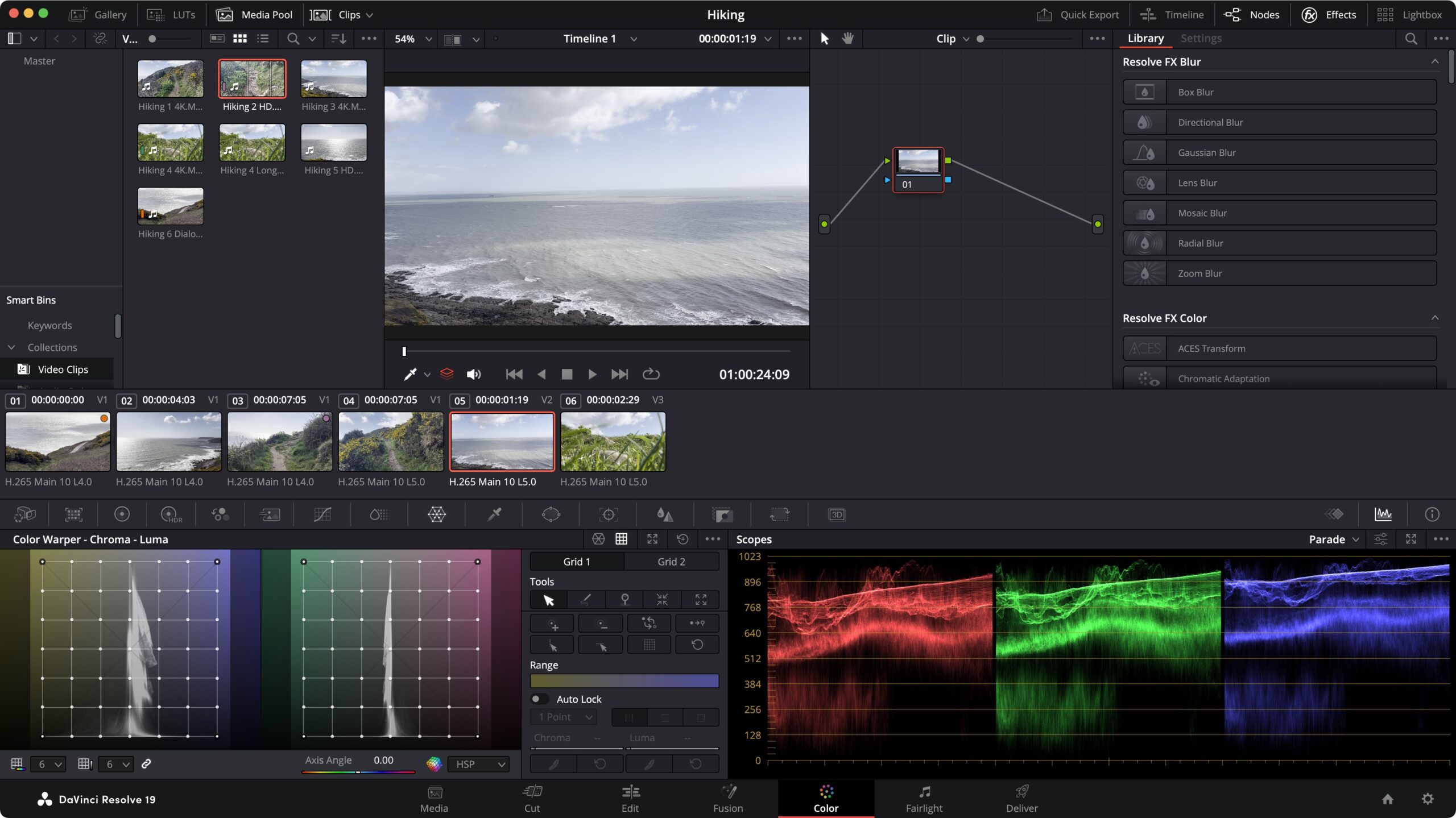
DaVinci Resolve
DaVinci Resolve is known for its powerful color correction and grading capabilities. It also includes professional audio editing tools and supports collaboration among team members working on the same project.
Lightroom
Lightroom is a go-to choice for photographers looking to enhance their photos with non-destructive editing tools. Its intuitive interface and cloud storage integration make it easy to organize and edit your photos on the go.
GIMP
GIMP (GNU Image Manipulation Program) is a free and open-source alternative to Photoshop. It offers a wide range of features for photo retouching, image composition, and graphic design, making it a great option for budget-conscious users.
Whether you are looking for professional-grade editing software or something more beginner-friendly, there are plenty of options available to suit your needs. Experiment with different tools to find the one that best fits your workflow and helps you unleash your creativity.
Top 9 Benefits of the Best Editing Software for Professionals and Creatives
- Advanced editing features for professional-level projects
- Intuitive user interface for easy navigation and quick learning curve
- Wide range of tools and effects to enhance creativity and productivity
- Regular updates and improvements to stay up-to-date with industry trends
- Compatibility with various file formats for seamless integration with other software
- Support for collaboration, allowing multiple users to work on the same project simultaneously
- High-quality output results with crisp images, smooth videos, and professional-grade graphics
- Customization options to personalize the editing environment according to user preferences
- Technical support and online resources for troubleshooting and learning new techniques
4 Drawbacks of Top Editing Software: Cost, Complexity, and Hardware Demands
- Steep learning curve for beginners
- High cost of subscription or one-time purchase
- System requirements may be demanding, requiring powerful hardware
- Some advanced features may be overwhelming for casual users
Advanced editing features for professional-level projects
The standout advantage of the best editing software lies in its advanced editing features tailored for professional-level projects. These sophisticated tools empower users to elevate their creative output by offering a range of capabilities such as intricate color grading, precise audio manipulation, seamless integration of visual effects, and complex timeline management. With these advanced features at their disposal, professionals can craft polished and visually stunning projects that meet the highest standards of quality and creativity. The ability to access such professional-grade tools within editing software not only streamlines the production process but also enables creators to push the boundaries of their artistic vision with precision and finesse.
Intuitive user interface for easy navigation and quick learning curve
One of the standout advantages of the best editing software is its intuitive user interface, designed to facilitate easy navigation and ensure a quick learning curve for users of all levels. A well-thought-out interface allows beginners to familiarize themselves with the tools and features efficiently, while also providing advanced users with a seamless editing experience. By prioritizing user-friendly design, editing software enhances productivity and creativity by minimizing the time spent on figuring out how to use the program, thus enabling users to focus more on their artistic vision and content creation.
Wide range of tools and effects to enhance creativity and productivity
The availability of a wide range of tools and effects in the best editing software not only enhances creativity but also boosts productivity. These diverse features empower users to experiment with different editing techniques, apply unique effects, and bring their creative vision to life. From advanced filters and adjustments to special effects and overlays, having a variety of tools at your disposal allows for endless possibilities in creating visually stunning content. Additionally, the efficiency gained from using a software with a comprehensive toolkit helps streamline the editing process, saving time and improving overall workflow efficiency.
Regular updates and improvements to stay up-to-date with industry trends
One significant advantage of the best editing software is the regular updates and improvements that ensure users stay up-to-date with industry trends. By consistently enhancing their features and functionality, top editing software providers enable users to access the latest tools and techniques, keeping their work relevant and competitive in a fast-evolving digital landscape. These updates not only enhance user experience but also demonstrate a commitment to innovation and responsiveness to changing industry standards, ultimately empowering creators to produce high-quality content efficiently and effectively.
Compatibility with various file formats for seamless integration with other software
One of the key advantages of the best editing software is its compatibility with various file formats, enabling seamless integration with other software applications. This feature allows users to work across different platforms and collaborate with ease, as they can import and export files in diverse formats without losing quality or data integrity. Whether you are editing photos, videos, or graphic designs, having software that supports a wide range of file types ensures smooth transitions between different tools and enhances workflow efficiency. This compatibility not only saves time but also provides flexibility for creative professionals to work with their preferred software combinations for optimal results.
Support for collaboration, allowing multiple users to work on the same project simultaneously
One significant advantage of the best editing software is its support for collaboration, enabling multiple users to work on the same project simultaneously. This feature promotes seamless teamwork and enhances productivity by allowing team members to contribute their expertise in real-time. With the ability to edit, review, and provide feedback concurrently, collaborative editing software fosters creativity and streamlines the workflow, ensuring that projects are completed efficiently and with input from all stakeholders.
High-quality output results with crisp images, smooth videos, and professional-grade graphics
One of the standout advantages of utilizing the best editing software is the ability to achieve high-quality output results. From producing crisp images to creating smooth videos and crafting professional-grade graphics, top-notch editing tools empower users to elevate the visual appeal and professionalism of their work. With advanced features for image enhancement, video stabilization, and graphic design precision, these software solutions enable creators to deliver polished and visually stunning content that captivates audiences and leaves a lasting impression.
Customization options to personalize the editing environment according to user preferences
One of the standout advantages of the best editing software is its extensive customization options, allowing users to personalize the editing environment according to their preferences. This level of customization empowers users to tailor the interface, toolbars, shortcuts, and workflow to suit their unique needs and working style. By being able to adjust settings and layout elements, users can create a more efficient and comfortable editing experience that enhances productivity and creativity. The ability to customize the software not only improves user satisfaction but also fosters a sense of ownership over the editing process, enabling individuals to work in a way that feels most natural and intuitive to them.
Technical support and online resources for troubleshooting and learning new techniques
One of the key advantages of using the best editing software is the access to comprehensive technical support and online resources that can greatly enhance your editing experience. Whether you encounter a technical issue, need guidance on a specific feature, or want to learn new editing techniques, having reliable support at your fingertips can be invaluable. From official tutorials and user forums to live chat assistance and troubleshooting guides, these resources empower users to troubleshoot problems efficiently and continuously expand their skills and knowledge base. This level of support ensures that users can make the most out of their editing software, enabling them to unleash their creativity without being hindered by technical obstacles.
Steep learning curve for beginners
One common drawback of the best editing software is the steep learning curve it presents for beginners. Navigating through complex interfaces, mastering intricate tools, and understanding advanced features can be overwhelming for those who are new to editing. The abundance of options and settings may initially confuse users and hinder their ability to efficiently utilize the software to its full potential. However, with dedication, practice, and access to tutorials or training resources, beginners can gradually overcome this challenge and develop the skills needed to effectively harness the power of professional editing software.
High cost of subscription or one-time purchase
One significant drawback of the best editing software is the high cost associated with either subscription-based models or one-time purchases. Many top editing tools, such as Adobe Creative Cloud, Final Cut Pro X, and DaVinci Resolve, require users to pay a substantial amount either monthly or as a one-time fee to access their full range of features. This cost can be prohibitive for individuals on a tight budget or hobbyists who may not require all the advanced functionalities offered by these premium software options. The expense of investing in editing software can be a barrier for aspiring creatives looking to enhance their skills and produce high-quality content.
System requirements may be demanding, requiring powerful hardware
One significant drawback of the best editing software is that they often come with demanding system requirements, necessitating powerful hardware to run smoothly. This can be a challenge for users with older or less capable computers, as upgrading to meet the software’s specifications can be costly. The need for high-performance hardware may limit access to these advanced editing tools for individuals on a budget or those using older devices. As technology continues to advance, the gap between software requirements and available hardware may pose a barrier for some users looking to utilize the full potential of these editing programs.
Some advanced features may be overwhelming for casual users
Some of the best editing software on the market may present a con for casual users in the form of advanced features that can be overwhelming. While these features are designed to provide powerful tools for professionals and enthusiasts to create high-quality content, they may prove to be complex and intimidating for those who are just starting out or using the software for basic editing tasks. Casual users may find themselves struggling to navigate through intricate settings and functionalities, which could hinder their creative process and overall editing experience. It is important for software developers to consider user-friendly interfaces and provide adequate tutorials to help casual users make the most of these advanced features without feeling overwhelmed.
Tags: advanced features, audio manipulation, best editing software, color grading, creativity, editing software, effects, learning curve, navigation, productivity, professional-level projects, timeline management, tools, user interface, visual effects