
The Best Free Video Editing Software for Windows 7
Video editing has become an essential skill in today’s digital age. Whether you’re a content creator, a social media enthusiast, or just someone who enjoys making home videos, having the right tools can make a huge difference. If you’re using Windows 7 and looking for free video editing software, you’re in luck! There are several great options available that can help you unleash your creativity without breaking the bank.
Windows Movie Maker
Windows Movie Maker is a classic video editing software that comes pre-installed on many Windows computers, including Windows
It offers basic editing features such as trimming, adding transitions, and applying effects. While it may not have all the bells and whistles of professional editing software, it’s a great option for beginners or casual users.
Shotcut
Shotcut is a powerful and versatile open-source video editor that is compatible with Windows
It supports a wide range of formats and includes advanced features like multi-track editing, audio mixing, and color grading. Despite its professional-grade capabilities, Shotcut is user-friendly and intuitive to use.
VSDC Free Video Editor
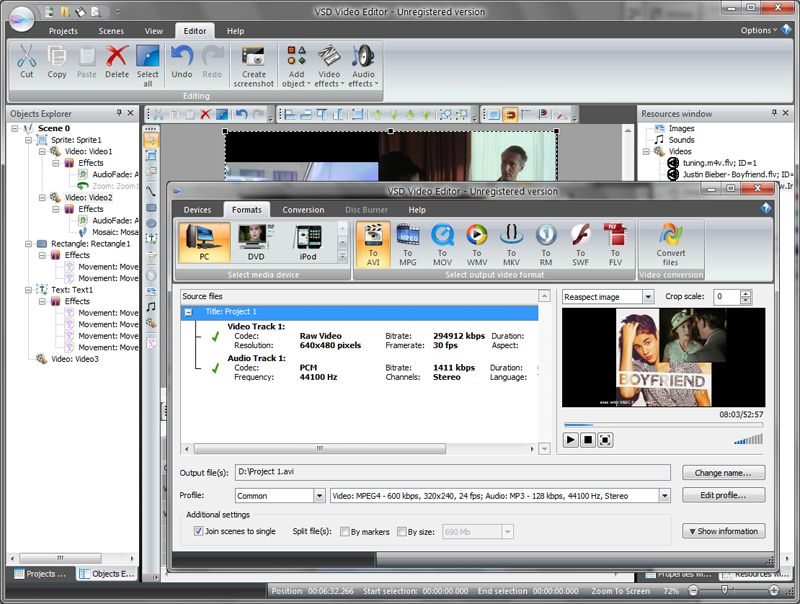
VSDC Free Video Editor is another excellent option for Windows 7 users looking for free video editing software. It offers a comprehensive set of tools for editing videos, including visual effects, transitions, and audio enhancements. With VSDC, you can create professional-looking videos without spending a dime.
Avidemux
Avidemux is a simple yet effective video editor that is compatible with Windows
It allows you to perform basic editing tasks such as cutting, filtering, and encoding videos. While it may not have as many features as some other video editors, Avidemux is lightweight and easy to use.
Lightworks
Lightworks is a feature-rich video editing software that offers both free and paid versions for Windows 7 users. The free version includes professional-grade tools for editing videos, including high-quality effects and transitions. Lightworks has been used to edit award-winning films and is trusted by professionals in the industry.
Whether you’re looking to create YouTube videos, family memories, or professional projects, these free video editing software options for Windows 7 have got you covered. Experiment with different tools to find the one that best suits your needs and unleash your creativity!
7 Essential Tips for Choosing Free Video Editing Software for Windows 7
- Look for user-friendly interfaces that are easy to navigate.
- Ensure the software supports a wide range of video formats for flexibility.
- Check for basic editing features like cutting, trimming, and merging clips.
- Consider software with built-in effects, transitions, and filters for enhanced creativity.
- Look for programs that offer tutorials or online support to help you learn how to use them effectively.
- Prioritize software that allows you to export videos in high quality without watermarks or limitations.
- Read reviews and user feedback to get an idea of the software’s performance and reliability.
Look for user-friendly interfaces that are easy to navigate.
When exploring free video editing software options for Windows 7, it is essential to prioritize user-friendly interfaces that are easy to navigate. A simple and intuitive interface can significantly enhance your editing experience, especially if you are new to video editing. Look for tools that offer clear menus, straightforward controls, and helpful tooltips to guide you through the editing process seamlessly. By choosing software with a user-friendly design, you can focus more on unleashing your creativity and less on navigating complex features.
Ensure the software supports a wide range of video formats for flexibility.
When choosing free video editing software for Windows 7, it is crucial to ensure that the software supports a wide range of video formats for flexibility. This feature allows you to work with various types of videos without worrying about compatibility issues. By having support for a diverse range of formats, you can seamlessly import, edit, and export your videos in different file types, ensuring that your editing process remains smooth and efficient. This flexibility empowers you to work with content from different sources and create high-quality videos tailored to your specific needs.
Check for basic editing features like cutting, trimming, and merging clips.
When exploring free video editing software options for Windows 7, it is essential to check for basic editing features such as cutting, trimming, and merging clips. These fundamental tools are crucial for creating seamless and professional-looking videos. By ensuring that the software offers these capabilities, users can efficiently edit their footage, remove unwanted sections, adjust the length of clips, and seamlessly combine multiple clips into a cohesive video. Prioritizing these basic editing features can help users streamline their editing process and achieve polished results without investing in expensive software.
Consider software with built-in effects, transitions, and filters for enhanced creativity.
When exploring free video editing software options for Windows 7, it’s beneficial to consider programs that offer built-in effects, transitions, and filters. These features can significantly enhance your creativity and help you achieve professional-looking results without the need for additional tools or resources. By utilizing built-in effects, transitions, and filters, you can add visual interest, polish your videos, and bring your creative vision to life with ease. Choose a software that provides a variety of options in this regard to elevate the quality and impact of your video projects.
Look for programs that offer tutorials or online support to help you learn how to use them effectively.
When exploring free video editing software options for Windows 7, it’s beneficial to prioritize programs that provide tutorials or online support to assist you in mastering their features efficiently. Having access to tutorials or online resources can significantly enhance your learning experience and help you navigate the software’s functionalities with ease. By choosing software that offers comprehensive guidance and support, you can quickly grasp the editing tools, techniques, and shortcuts, enabling you to create polished and professional-looking videos seamlessly.
Prioritize software that allows you to export videos in high quality without watermarks or limitations.
When choosing free video editing software for Windows 7, it is crucial to prioritize options that enable you to export videos in high quality without any watermarks or limitations. This ensures that your final creations maintain their professional look and are suitable for sharing on various platforms without any restrictions. By selecting software that offers unrestricted exporting capabilities, you can showcase your creativity and skills without compromising on the visual integrity of your videos.
Read reviews and user feedback to get an idea of the software’s performance and reliability.
When exploring free video editing software options for Windows 7, it’s important to read reviews and user feedback to gain insights into the software’s performance and reliability. By checking what other users have experienced, you can get a better idea of how well the software functions, its ease of use, and any potential limitations or drawbacks. Reviews and feedback from real users can provide valuable information that can help you make an informed decision on which software best suits your needs and expectations.
Tags: easy to navigate, editing process, flexibility, formats, free, free video editing software for windows 7, support, tools, user-friendly interfaces, video editing software, windows 7