
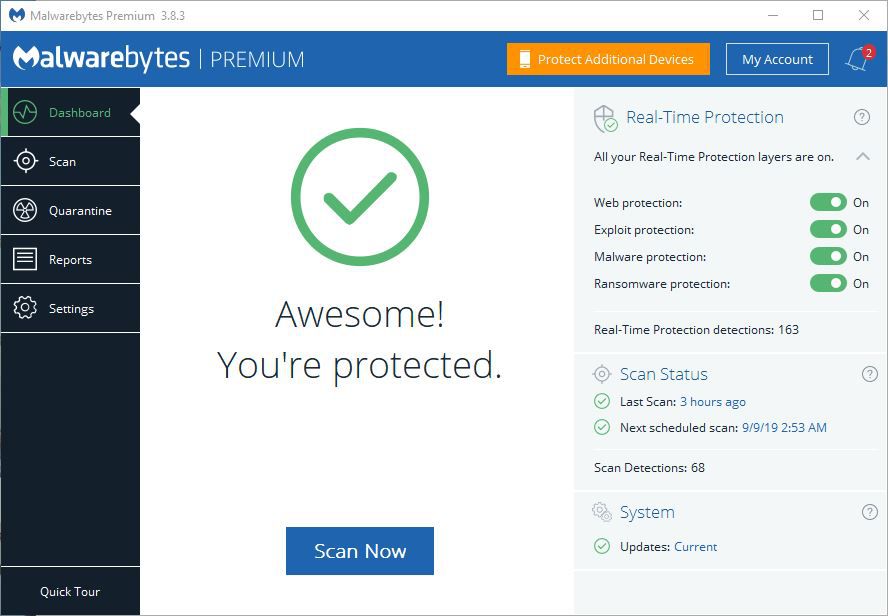
The Importance of Malicious Software Removal Tool
Malicious software, also known as malware, poses a significant threat to computer systems and networks worldwide. These malicious programs are designed to infiltrate, damage, or gain unauthorized access to computers and devices, compromising sensitive information and disrupting normal operations.
One essential tool in combating malware is the Malicious Software Removal Tool (MSRT) developed by Microsoft. This tool is designed to scan for and remove specific prevalent malicious software from Windows-based computers.
The MSRT is a free utility that is regularly updated by Microsoft to detect and remove prevalent malware such as viruses, worms, Trojans, and other harmful software. It complements existing antivirus programs by targeting specific threats that may not be detected by traditional security software.
Using the MSRT is crucial in maintaining the security and integrity of your computer system. By running regular scans with this tool, you can identify and eliminate potentially harmful malware that may have evaded detection by your primary antivirus program.
Furthermore, the MSRT helps prevent the spread of malware across networks by removing infections from compromised machines. This proactive approach to malware removal can help protect not only your own system but also other connected devices within your network.
In conclusion, the Malicious Software Removal Tool is a valuable resource in the fight against malware threats. By incorporating this tool into your cybersecurity arsenal and running regular scans, you can enhance the overall security posture of your computer system and safeguard your digital assets from malicious attacks.
9 Essential Tips for Effectively Using a Malicious Software Removal Tool
- Regularly update the malicious software removal tool to ensure it can detect and remove the latest threats.
- Run a full system scan with the tool periodically to check for any malicious software on your device.
- Be cautious when downloading files or clicking on links from unknown sources to prevent malware infections.
- Enable real-time protection if available in the tool settings to actively guard against threats in real-time.
- Use additional security measures such as firewalls and antivirus software alongside the removal tool for comprehensive protection.
- Educate yourself about common signs of malware infection, such as slow performance or unexpected pop-ups, to take prompt action.
- Avoid using outdated operating systems or software versions that may be vulnerable to malware attacks.
- Backup your important data regularly to mitigate the impact of potential malware attacks or removal processes.
- If you suspect an infection despite using the removal tool, seek professional help from cybersecurity experts.
Regularly update the malicious software removal tool to ensure it can detect and remove the latest threats.
Regularly updating the malicious software removal tool is crucial to ensure its effectiveness in detecting and removing the latest threats. By staying up-to-date with the tool’s database of known malware signatures and patterns, you can enhance its ability to identify and eliminate newly emerging malicious software. Keeping the tool current helps bolster your system’s defenses against evolving cyber threats, providing a proactive approach to safeguarding your computer from potential security breaches and data compromises.
Run a full system scan with the tool periodically to check for any malicious software on your device.
To enhance your device’s security and protect it from potential threats, it is advisable to run a full system scan with the Malicious Software Removal Tool periodically. By conducting regular scans, you can proactively check for any malicious software that may have infiltrated your device undetected. This preventive measure helps ensure that your system remains free from harmful malware, maintaining its integrity and safeguarding your sensitive data from cyber threats.
Be cautious when downloading files or clicking on links from unknown sources to prevent malware infections.
It is crucial to exercise caution when downloading files or clicking on links from unknown sources to avoid potential malware infections. Malicious software can be disguised as legitimate files or links, tricking unsuspecting users into compromising their systems. By being vigilant and refraining from interacting with suspicious content, you can significantly reduce the risk of falling victim to malware attacks. Remember, prevention is key in maintaining a secure digital environment and safeguarding your personal data and devices from harmful threats.
Enable real-time protection if available in the tool settings to actively guard against threats in real-time.
Enabling real-time protection in the Malicious Software Removal Tool settings is a crucial step in actively guarding against threats in real-time. By turning on this feature, the tool can constantly monitor your system for any suspicious activity or malware attempts, providing immediate protection and preventing potential infections before they can cause harm. Real-time protection adds an extra layer of security to your computer, ensuring that you are proactively defended against evolving threats as they emerge.
Use additional security measures such as firewalls and antivirus software alongside the removal tool for comprehensive protection.
To enhance the effectiveness of a malicious software removal tool, it is essential to implement additional security measures such as firewalls and antivirus software. While the removal tool targets specific prevalent malware, firewalls act as a barrier against unauthorized access and incoming threats, while antivirus software provides real-time protection against a wide range of malicious programs. By combining these tools, users can create a robust defense system that offers comprehensive protection against malware attacks, ensuring the security and integrity of their computer systems and networks.
Educate yourself about common signs of malware infection, such as slow performance or unexpected pop-ups, to take prompt action.
It is crucial to educate yourself about common signs of malware infection, such as slow performance or unexpected pop-ups, in order to take prompt action and protect your computer system. By staying vigilant and recognizing these warning signs, you can proactively address potential malware threats before they cause significant damage. Being aware of these indicators allows you to promptly run scans with tools like the Malicious Software Removal Tool to identify and remove any malicious software that may be compromising your system’s security.
Avoid using outdated operating systems or software versions that may be vulnerable to malware attacks.
To enhance your cybersecurity defenses and protect your digital assets, it is crucial to avoid using outdated operating systems or software versions that may be vulnerable to malware attacks. Running obsolete software increases the risk of security breaches, as cybercriminals often target known vulnerabilities in outdated systems. By keeping your operating system and software up-to-date with the latest security patches and updates, you can mitigate the risk of malware infections and ensure a more secure computing environment. Regularly updating your software is a proactive step towards safeguarding your system against potential threats and maintaining a strong defense against malicious attacks.
Backup your important data regularly to mitigate the impact of potential malware attacks or removal processes.
Backing up your important data regularly is a crucial tip to mitigate the impact of potential malware attacks or removal processes. By creating backups of your valuable files, documents, and other data, you can ensure that even if your system is compromised by malware or if data loss occurs during the removal process, you have a secure copy to restore from. Regular backups provide an extra layer of protection and peace of mind, allowing you to recover quickly and efficiently in the event of a cybersecurity incident.
If you suspect an infection despite using the removal tool, seek professional help from cybersecurity experts.
If you suspect an infection despite utilizing a malicious software removal tool, it is crucial to seek professional help from cybersecurity experts. Cybersecurity professionals possess the expertise and tools necessary to conduct a thorough analysis of your system, identify any persistent threats, and implement advanced remediation strategies to eradicate malware effectively. By consulting with professionals, you can ensure that any potential security breaches are addressed promptly and that your systems are secure from sophisticated cyber threats.
Tags: antivirus programs, cyber threats, cybersecurity arsenal, data compromises, device's security, digital assets, full system scan, malicious software, malicious software removal tool, malware, malware infections, microsoft, msrt, potential threats, real-time protection, removal tool, security breaches, security software, system scan, system's defenses, unknown sources