
The Power of Rhino Software in 3D Design and Modeling
When it comes to 3D design and modeling, Rhino software stands out as a powerful tool that offers a wide range of capabilities for professionals in various industries.
With its intuitive interface and robust features, Rhino allows designers, architects, engineers, and artists to create intricate 3D models with precision and efficiency. The software’s versatile tools enable users to sculpt organic shapes, manipulate surfaces, and generate complex geometries with ease.
One of the key strengths of Rhino software is its flexibility in handling different file formats, making it compatible with other design software and facilitating seamless collaboration among team members. This interoperability enhances workflow efficiency and streamlines the design process.
Furthermore, Rhino’s advanced rendering capabilities produce stunning visualizations that bring designs to life, helping users communicate their ideas effectively and make informed decisions. The software’s rendering tools allow for realistic lighting effects, material textures, and shadow simulations that enhance the overall presentation of 3D models.
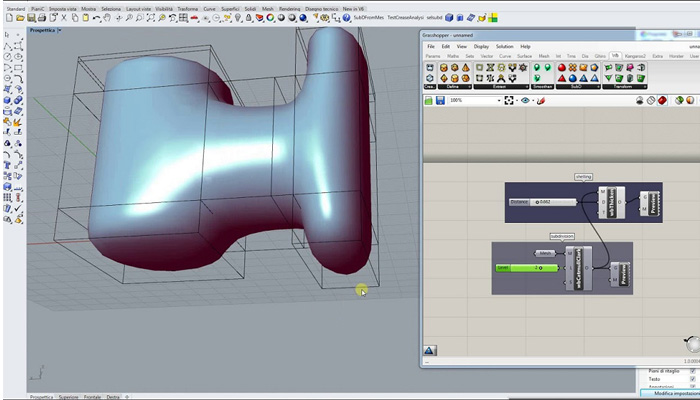
Whether creating architectural structures, product prototypes, or artistic compositions, Rhino software empowers users to unleash their creativity and turn concepts into reality. Its parametric modeling features enable quick iterations and modifications, allowing designers to explore multiple design options without starting from scratch.
In conclusion, Rhino software is a valuable asset for professionals seeking a comprehensive 3D design solution that combines functionality with user-friendly interface. With its powerful tools and versatile capabilities, Rhino continues to be a preferred choice for those looking to push the boundaries of creativity in the world of digital design.
7 Benefits of Rhino Software: Enhancing 3D Design and Modeling Efficiency
- Intuitive interface for easy navigation and user-friendly experience.
- Versatile tools that allow for intricate 3D modeling and design capabilities.
- Compatibility with various file formats, enabling seamless collaboration with other software.
- Advanced rendering features for creating realistic visualizations and presentations.
- Parametric modeling functionality for quick iterations and design modifications.
- Wide range of applications across industries, including architecture, engineering, and art.
- Powerful capabilities to handle complex geometries and organic shapes with precision.
Challenges of Rhino Software: Complexity, Limited Rendering, and Cost
- Steep learning curve for beginners due to the software’s complexity
- Limited built-in rendering options compared to other specialized rendering software
- Higher price point may be prohibitive for individual users or small businesses
Intuitive interface for easy navigation and user-friendly experience.
Rhino software’s intuitive interface offers users an effortless navigation experience, making it a user-friendly tool for 3D design and modeling. With its well-organized layout and straightforward controls, users can quickly familiarize themselves with the software and efficiently access its wide range of features. This ease of use enhances productivity and creativity, allowing designers, architects, and artists to focus on their craft without being hindered by a steep learning curve. The intuitive design of Rhino software ensures a smooth and enjoyable user experience, making it a preferred choice for professionals across various industries.
Versatile tools that allow for intricate 3D modeling and design capabilities.
Rhino software’s versatile tools offer users the ability to engage in intricate 3D modeling and design with remarkable capabilities. Whether crafting complex geometries, sculpting organic shapes, or manipulating surfaces, Rhino empowers designers, architects, engineers, and artists to bring their creative visions to life with precision and detail. The software’s flexibility in handling various design tasks enables users to explore a wide range of possibilities, making it a go-to choice for professionals across different industries seeking advanced 3D modeling solutions.
Compatibility with various file formats, enabling seamless collaboration with other software.
One of the standout advantages of Rhino software is its exceptional compatibility with a wide range of file formats. This feature allows users to seamlessly collaborate with other design software, enhancing workflow efficiency and facilitating effective communication among team members. By supporting diverse file types, Rhino enables designers, architects, engineers, and artists to easily import and export projects, ensuring smooth integration with different tools and platforms. This interoperability not only streamlines the design process but also promotes a collaborative environment where ideas can be shared and implemented across various software applications effortlessly.
Advanced rendering features for creating realistic visualizations and presentations.
Rhino software’s advanced rendering features elevate the design experience by enabling users to create realistic visualizations and presentations with remarkable detail and precision. With capabilities for simulating lighting effects, material textures, and shadow interactions, Rhino empowers designers to showcase their 3D models in a visually compelling manner. These rendering tools not only enhance the aesthetic appeal of designs but also help communicate ideas effectively, making it easier for stakeholders to visualize the final product and make informed decisions. The ability to produce lifelike renderings sets Rhino apart as a powerful tool for creating immersive and engaging presentations that bring designs to life.
Parametric modeling functionality for quick iterations and design modifications.
Rhino software’s parametric modeling functionality is a game-changer for designers and artists looking to streamline their workflow and enhance productivity. This feature allows users to make quick iterations and design modifications with ease, saving valuable time and effort. By adjusting parameters and variables within the model, designers can explore multiple design options rapidly without having to recreate the entire project from scratch. This flexibility not only speeds up the design process but also encourages creative experimentation, empowering users to fine-tune their creations until they achieve the desired outcome. In essence, Rhino’s parametric modeling capability is a powerful tool that promotes efficiency, innovation, and precision in 3D design and modeling projects.
Wide range of applications across industries, including architecture, engineering, and art.
Rhino software’s versatility shines through its wide range of applications across diverse industries such as architecture, engineering, and art. Architects leverage Rhino’s powerful tools to create intricate building designs and visualize architectural concepts with precision. Engineers rely on the software’s robust capabilities for generating complex geometries and analyzing structural components. Artists harness Rhino’s creative features to sculpt organic shapes and produce visually stunning 3D artworks. The software’s adaptability across these industries highlights its effectiveness in facilitating innovative design solutions and pushing the boundaries of creativity in various professional fields.
Powerful capabilities to handle complex geometries and organic shapes with precision.
Rhino software stands out for its exceptional ability to handle complex geometries and organic shapes with unparalleled precision. Designers and artists rely on Rhino’s powerful capabilities to sculpt intricate forms and manipulate surfaces with ease. Whether creating architectural structures or artistic compositions, Rhino empowers users to push the boundaries of creativity by effortlessly working with intricate shapes and achieving precise results. Its intuitive tools enable users to explore innovative design concepts and bring their visions to life with remarkable accuracy and detail.
Steep learning curve for beginners due to the software’s complexity
One notable drawback of Rhino software is its steep learning curve, which can pose a challenge for beginners entering the world of 3D design and modeling. The software’s complexity, extensive features, and intricate tools may overwhelm new users who are not familiar with its interface and functionalities. Navigating through Rhino’s advanced capabilities and mastering its various commands and functions require time, dedication, and patience. While the software offers immense potential for creating sophisticated 3D models, the initial learning curve can be a significant barrier for individuals looking to quickly grasp the basics and start designing efficiently.
Limited built-in rendering options compared to other specialized rendering software
One notable drawback of Rhino software is its limited built-in rendering options when compared to other specialized rendering software available in the market. While Rhino offers basic rendering capabilities, it may lack the advanced features and customization options found in dedicated rendering tools. This limitation can impact the quality and realism of visualizations produced within Rhino, making it less suitable for users who require high-fidelity renderings or complex lighting effects in their 3D designs. As a result, professionals seeking sophisticated rendering solutions may find themselves needing to integrate Rhino with external rendering plugins or software to achieve desired results, adding complexity to their workflow.
Higher price point may be prohibitive for individual users or small businesses
One significant drawback of Rhino software is its higher price point, which may pose a barrier for individual users or small businesses looking to invest in 3D design and modeling tools. The cost of acquiring licenses for Rhino software can be prohibitive for those operating on limited budgets, especially when compared to other more affordable or open-source alternatives available in the market. This pricing constraint may limit access to the advanced features and capabilities offered by Rhino, making it challenging for some users to fully leverage the software’s potential for their design projects.
Tags: 3d design, architects, artists, capabilities, collaboration facilitation, compatibility with other software, complex geometries, designers, efficiency, engineers, file formats handling, flexibility, industries, intricate models, intuitive interface, modeling, organic shapes, powerful tool, precision, professionals, rendering capabilities, rhino software, robust features, surfaces manipulation, versatile tools, visualizations production, workflow efficiency enhancement