
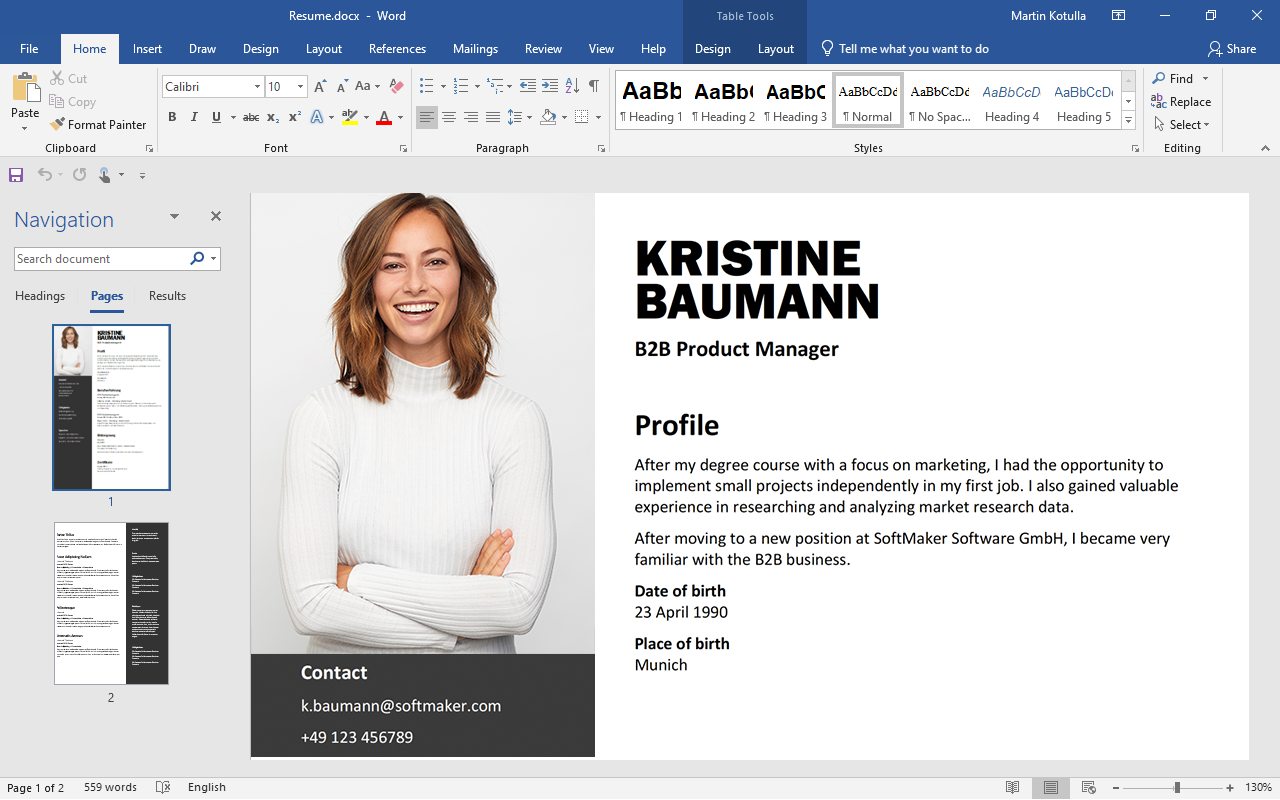
The Benefits of Free Office Software
In today’s digital age, office software is essential for productivity and efficiency in both personal and professional settings. While popular paid options like Microsoft Office have long dominated the market, free office software alternatives have been gaining traction for their cost-effectiveness and versatility.
Cost-Effective Solution
One of the primary advantages of free office software is its cost-effectiveness. For individuals and organizations operating on a tight budget, opting for free office suites such as LibreOffice or Apache OpenOffice can result in significant savings without compromising on essential features.
Compatibility and Interoperability
Free office software often boasts compatibility with popular file formats such as Microsoft Word, Excel, and PowerPoint. This interoperability ensures seamless collaboration with users who may be using different office suites, promoting efficiency and eliminating compatibility issues.
Feature-Rich Functionality
Despite being free, many office software alternatives offer a wide range of features comparable to their paid counterparts. From word processing and spreadsheet management to presentation creation and database manipulation, free office suites provide comprehensive tools to meet diverse user needs.
Community Support and Updates
Free office software benefits from active community support, with developers constantly refining and updating the applications based on user feedback. This collaborative approach ensures that users receive regular updates, bug fixes, and new features to enhance their overall experience.
User-Friendly Interface
Free office software is designed with user-friendly interfaces that cater to both novice and experienced users. Intuitive layouts, customizable settings, and extensive documentation make it easy for individuals to quickly adapt to the software’s functionality without extensive training.
Conclusion
In conclusion, free office software presents a compelling alternative to traditional paid solutions by offering cost-effective pricing, compatibility with popular file formats, feature-rich functionality, community support, and user-friendly interfaces. Whether you are a student, freelancer, small business owner, or large enterprise, exploring free office software options can help streamline your workflow and boost productivity without breaking the bank.
8 Essential Tips for Maximizing Free Office Software Solutions
- 1. Consider using open-source office suites like LibreOffice or OpenOffice for free alternatives to paid software.
- 2. Take advantage of cloud-based office tools such as Google Docs, Sheets, and Slides for easy collaboration and access from any device.
- 3. Explore free online presentation platforms like Canva or Prezi for creating visually appealing slideshows.
- 4. Utilize free document storage services like Dropbox or OneDrive to store and share your files securely.
- 5. Check out free project management tools like Trello or Asana to organize tasks and increase productivity.
- 6. Use online PDF converters such as Smallpdf or PDF24 to easily convert documents into PDF format for sharing.
- 7. Take advantage of free email clients like Thunderbird or Mailbird for managing your emails efficiently.
- 8. Explore free note-taking applications like Evernote or OneNote to keep track of ideas, tasks, and important information.
1. Consider using open-source office suites like LibreOffice or OpenOffice for free alternatives to paid software.
When seeking free alternatives to paid office software, consider utilizing open-source office suites such as LibreOffice or OpenOffice. These robust applications offer a wide range of features comparable to their paid counterparts, making them excellent choices for individuals and organizations looking to save costs without compromising on functionality. By opting for open-source solutions, users can benefit from regular updates, community support, and seamless compatibility with popular file formats, ensuring a smooth transition to a cost-effective office software solution.
2. Take advantage of cloud-based office tools such as Google Docs, Sheets, and Slides for easy collaboration and access from any device.
To enhance collaboration and accessibility in your work, leverage cloud-based office tools like Google Docs, Sheets, and Slides. These versatile applications allow you to create, edit, and share documents, spreadsheets, and presentations seamlessly across different devices. With real-time syncing and automatic saving features, you can work collaboratively with teammates or access your files from anywhere with an internet connection. Embracing cloud-based office tools not only streamlines teamwork but also ensures flexibility and convenience in managing your tasks efficiently.
3. Explore free online presentation platforms like Canva or Prezi for creating visually appealing slideshows.
When seeking alternatives to traditional office software, consider exploring free online presentation platforms such as Canva or Prezi. These tools offer intuitive interfaces and a wide array of templates and design elements to create visually appealing slideshows effortlessly. By leveraging the features of Canva or Prezi, users can enhance their presentations with engaging visuals, animations, and interactive elements, making their content more compelling and memorable for audiences.
4. Utilize free document storage services like Dropbox or OneDrive to store and share your files securely.
Utilizing free document storage services like Dropbox or OneDrive is a smart tip to enhance your use of free office software. By storing your files securely in the cloud, you can access them from any device with an internet connection, ensuring seamless collaboration and flexibility. These services offer robust security features to protect your data and enable easy file sharing with colleagues or clients. Embracing cloud storage not only simplifies file management but also enhances productivity by providing a centralized location for all your documents, presentations, and spreadsheets.
5. Check out free project management tools like Trello or Asana to organize tasks and increase productivity.
Exploring free project management tools such as Trello or Asana can be a game-changer when it comes to organizing tasks and boosting productivity. These platforms offer intuitive interfaces, customizable features, and collaborative functionalities that streamline task management and team coordination. By leveraging these free tools, individuals and organizations can enhance efficiency, prioritize projects effectively, track progress seamlessly, and ultimately achieve their goals in a structured and organized manner.
6. Use online PDF converters such as Smallpdf or PDF24 to easily convert documents into PDF format for sharing.
Utilizing online PDF converters like Smallpdf or PDF24 can be a convenient and efficient way to convert documents into PDF format for seamless sharing. By simply uploading your files to these platforms, you can quickly transform them into universally compatible PDF files that retain formatting and ensure readability across different devices and operating systems. This tip not only simplifies the process of sharing documents but also helps maintain the integrity of your content while enhancing its accessibility for recipients.
7. Take advantage of free email clients like Thunderbird or Mailbird for managing your emails efficiently.
To enhance your email management efficiency, consider utilizing free email clients such as Thunderbird or Mailbird. These tools offer a user-friendly interface and a range of features to streamline your email organization process. By taking advantage of these free options, you can better manage your emails, improve communication productivity, and ensure that important messages are promptly addressed.
8. Explore free note-taking applications like Evernote or OneNote to keep track of ideas, tasks, and important information.
Explore free note-taking applications like Evernote or OneNote to enhance your productivity and organization. These versatile tools allow you to capture and organize ideas, tasks, and important information in a centralized digital platform. With features such as cloud synchronization, cross-device accessibility, and customizable organization options, Evernote and OneNote empower you to stay on top of your notes wherever you go. Whether you are a student, professional, or creative individual, leveraging free note-taking applications can help streamline your workflow and boost efficiency in managing your daily responsibilities.
Tags: benefits, cloud-based office tools, community support, compatibility, cost-effective solution, feature-rich functionality, free office software, google docs, interoperability, libreoffice, open-source office suites, openoffice, sheets, slides, updates, user-friendly interface