
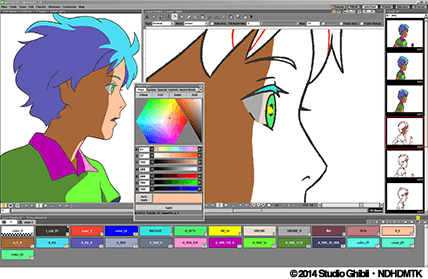
The Power of 2D Animation Software
Animation has come a long way since its early days, and 2D animation software has played a significant role in shaping the industry. With the advancement of technology, creating captivating animations has become more accessible than ever before.
2D animation software allows artists and creators to bring their imaginations to life with ease. Whether you are a seasoned animator or a beginner exploring the world of animation, these tools offer a wide range of features and functionalities to unleash your creativity.
Benefits of Using 2D Animation Software:
- Flexibility: 2D animation software provides flexibility in creating various styles and visual effects, allowing artists to experiment and innovate.
- Cost-Effective: Compared to 3D animation, 2D animation software is often more budget-friendly, making it an ideal choice for independent creators and small studios.
- User-Friendly Interface: Many 2D animation tools come with intuitive interfaces that are easy to navigate, making the learning curve smoother for beginners.
- Rapid Production: With efficient tools and features, artists can produce animations at a faster pace without compromising on quality.
- Creative Expression: From traditional hand-drawn animations to modern digital techniques, 2D animation software offers endless possibilities for artistic expression.
Popular 2D Animation Software:
There are numerous 2D animation software options available in the market, each catering to different needs and preferences. Some popular choices among animators include:
- Toon Boom Harmony
- Adobe Animate
- Synfig Studio
- Pencil2D
- CrazyTalk Animator
Whether you are creating animated shorts, explainer videos, or educational content, choosing the right 2D animation software can significantly impact the quality and efficiency of your work.
In conclusion, 2D animation software continues to empower artists and creators worldwide by providing them with the tools they need to bring their visions to life. With its versatility and accessibility, this technology opens up endless possibilities for storytelling and visual communication in the digital age.
Mastering 2D Animation Software: 7 Essential Tips for Beginners
- Start with simple projects to get familiar with the software.
- Use layers to organize different elements of your animation.
- Take advantage of keyframes for smooth and precise motion.
- Experiment with different tools and effects to enhance your animations.
- Pay attention to timing and spacing for realistic movement.
- Seek inspiration from other animators and tutorials to improve your skills.
- Save your work regularly to avoid losing progress.
Start with simple projects to get familiar with the software.
Starting with simple projects is a valuable tip for anyone delving into 2D animation software. By beginning with straightforward tasks, such as creating basic shapes or short animations, users can gradually familiarize themselves with the software’s interface, tools, and capabilities. This approach not only helps build confidence but also allows for a smoother transition to more complex projects in the future. Mastering the fundamentals through simplicity sets a solid foundation for exploring the full potential of 2D animation software and unleashing one’s creativity effectively.
Use layers to organize different elements of your animation.
When working with 2D animation software, a valuable tip is to utilize layers to effectively organize different elements of your animation. By separating various components such as characters, backgrounds, and effects onto individual layers, you can easily manage and manipulate each element independently. This not only streamlines the animation process but also allows for greater control and precision in creating dynamic and visually appealing animations. Layers serve as a practical tool to enhance efficiency and creativity in your animation projects, enabling you to focus on refining each element seamlessly for a polished final result.
Take advantage of keyframes for smooth and precise motion.
To enhance the quality of your animations, it is crucial to take advantage of keyframes when using 2D animation software. Keyframes allow you to define specific points in your animation where important changes occur, such as movement, scale, or rotation. By strategically placing keyframes throughout your animation timeline, you can achieve smooth and precise motion transitions, resulting in a more polished and professional-looking final product. Mastering the use of keyframes can greatly improve the fluidity and realism of your animations, helping you bring your creative vision to life with precision and finesse.
Experiment with different tools and effects to enhance your animations.
To elevate your animations to the next level, it is essential to experiment with a variety of tools and effects offered by 2D animation software. By exploring different techniques, styles, and visual elements, you can add depth, creativity, and uniqueness to your animations. Whether it’s experimenting with textures, lighting effects, or motion paths, pushing the boundaries of traditional animation can lead to stunning results that captivate your audience and showcase your artistic prowess. Embrace the opportunity to innovate and discover new ways to enhance your animations through continuous experimentation and exploration of the diverse features available in 2D animation software.
Pay attention to timing and spacing for realistic movement.
When working with 2D animation software, it is crucial to pay attention to timing and spacing to achieve realistic movement in your animations. By carefully adjusting the timing of each frame and the spacing between key poses, you can create fluid and natural motion that captures the essence of real-life movement. This attention to detail not only enhances the quality of your animations but also helps convey emotions and storytelling effectively to your audience. Mastering timing and spacing is a fundamental skill for animators looking to bring their characters and scenes to life with authenticity and impact.
Seek inspiration from other animators and tutorials to improve your skills.
To enhance your skills in using 2D animation software, it is beneficial to seek inspiration from other animators and tutorials. By studying the work of experienced animators and following step-by-step guides, you can gain valuable insights, learn new techniques, and expand your creative repertoire. Drawing inspiration from a diverse range of sources not only helps you improve your technical skills but also fosters innovation and originality in your animations. Embracing a continuous learning mindset through observing and learning from others can elevate your proficiency and artistry in the dynamic world of 2D animation.
Save your work regularly to avoid losing progress.
It is crucial to save your work regularly while using 2D animation software to prevent the risk of losing progress. By saving your project frequently, you ensure that any unexpected technical issues or system crashes do not result in hours of work being lost. This simple tip can help you maintain continuity in your creative process and avoid frustration caused by potential data loss. Remember, a few extra seconds spent on saving your work can save you valuable time and effort in the long run.
Tags: 2d animation software, adobe animate, animated shorts, artists, cost-effective, crazytalk animator, creative expression, creators, educational content, explainer videos, features, flexibility, imagination, industry, pencil2d, popular choices, rapid production, synfig studio, technology, tools, toon boom harmony, user-friendly interface, visual effects